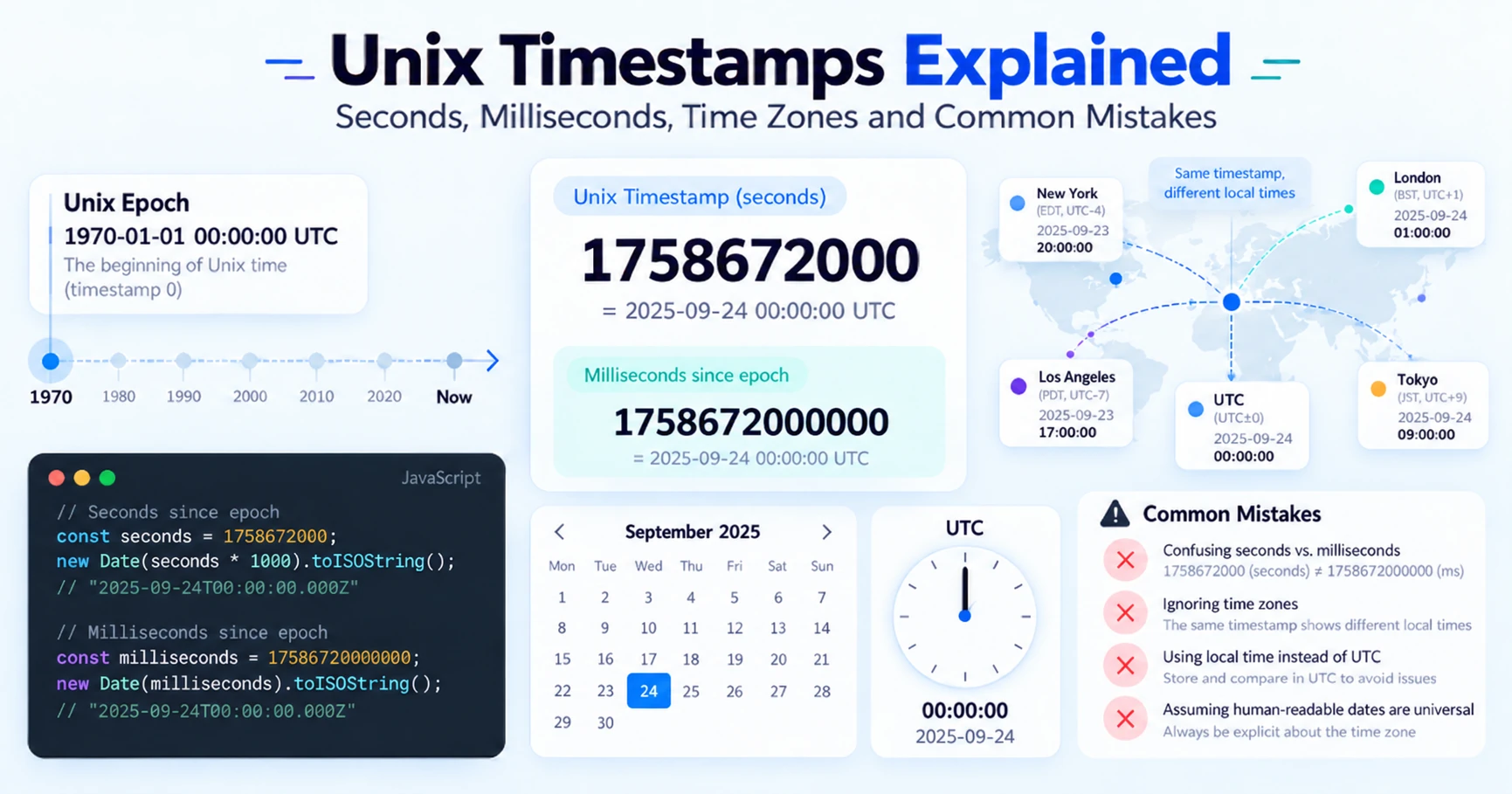
Unix timestamps are everywhere. APIs use them, databases store them, logs are full of them, JavaScript returns them, and authentication tokens contain them.
And yet timestamps are responsible for a surprising number of bugs.
Is 1790186400 a date? What about 1790186400000? Does a Unix timestamp contain a time zone? Why does JavaScript sometimes show a date in your local time when the timestamp itself is supposed to be UTC?
This article explains how Unix timestamps actually work, the difference between seconds and milliseconds, how time zones fit into the picture, and the mistakes developers most commonly make.
What is a Unix timestamp?
A Unix timestamp represents the amount of time that has passed since January 1, 1970 at 00:00:00 UTC. This moment is commonly called the Unix epoch.
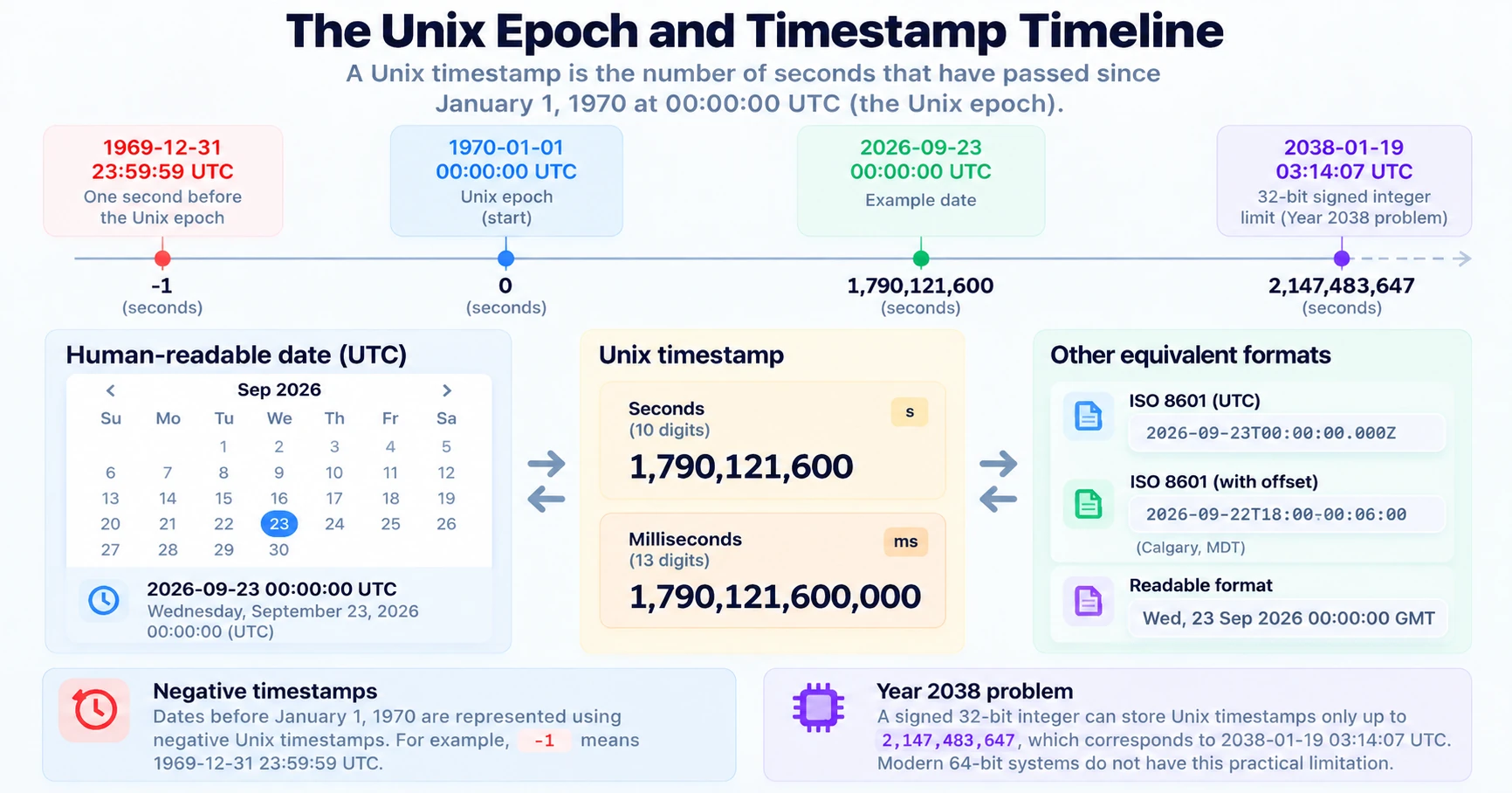
For example, 0 represents:
1970-01-01 00:00:00 UTC
A timestamp such as 1790186400 represents a specific moment after the Unix epoch:
2026-09-23 18:00:00 UTC
The important part is that the timestamp represents an instant in time, not a formatted date. A value such as 2026-09-23 18:00:00 is a human-readable representation. A Unix timestamp is simply a number.
Seconds vs milliseconds
One of the most common timestamp bugs comes from confusing seconds with milliseconds.
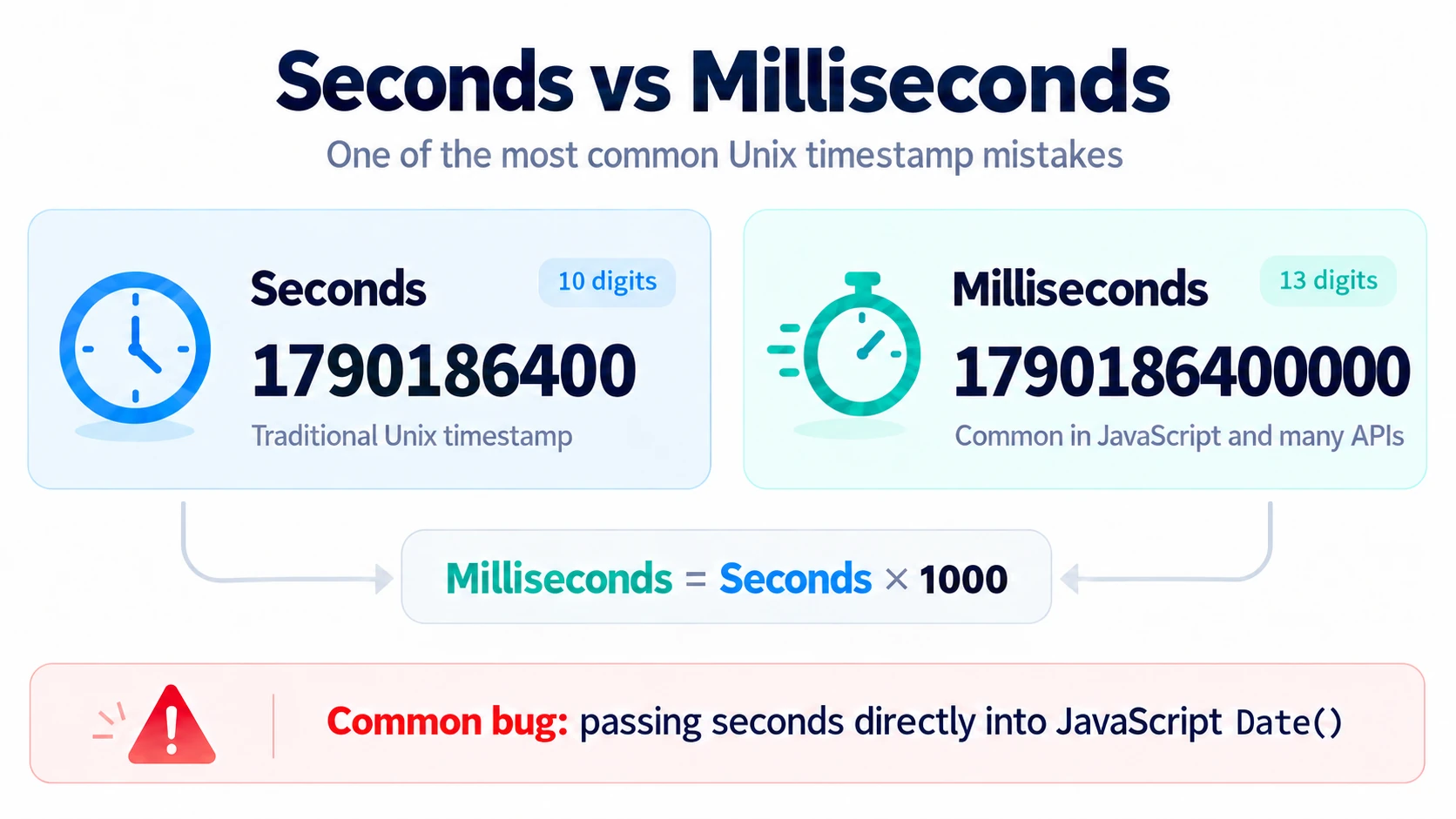
Traditional Unix timestamps use seconds since January 1, 1970. Many programming environments, however, use milliseconds. The same instant looks like this in each unit:
Seconds:      1790186400
Milliseconds: 1790186400000
Milliseconds usually have three extra digits. A quick rule of thumb:
10 digits -> usually seconds
13 digits -> usually milliseconds
This works for modern dates, but you should not rely on digit count as formal validation.
JavaScript uses milliseconds
JavaScript's Date API expects milliseconds:
const timestamp = 1790186400000
const date = new Date(timestamp)
console.log(date)
But many APIs return Unix timestamps in seconds:
const timestamp = 1790186400
If you pass that directly to Date, JavaScript interprets it as milliseconds, and the resulting date lands in January 1970:
new Date(1790186400) // 1970-01-21T17:16:26.400Z
Instead, convert seconds to milliseconds:
const timestamp = 1790186400
const date = new Date(timestamp * 1000)
The reverse operation works the same way. To get the current Unix timestamp in seconds:
const timestamp = Math.floor(Date.now() / 1000)
To get milliseconds:
const timestamp = Date.now()
Does a Unix timestamp have a time zone?
No. This is one of the most important things to understand about timestamps.
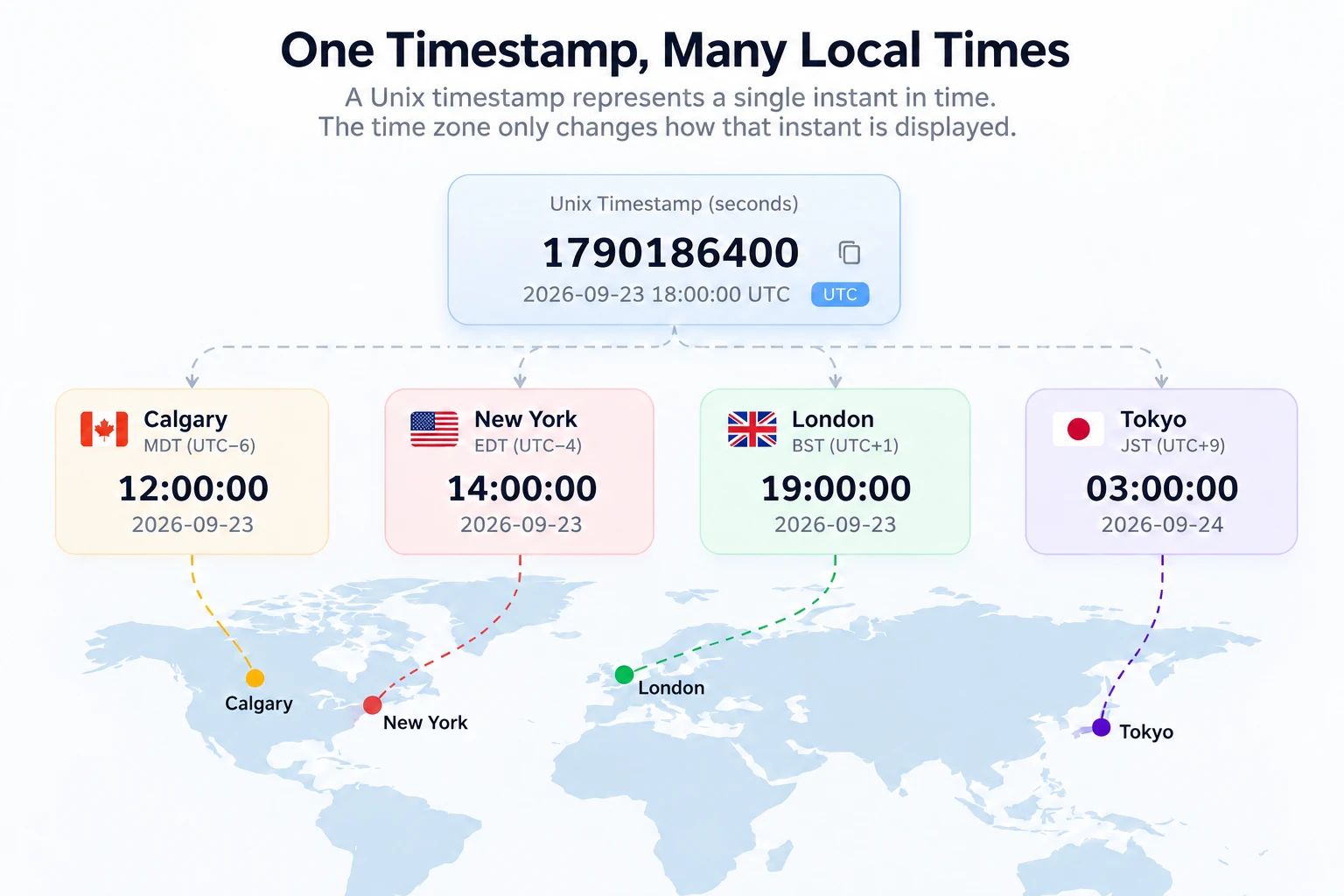
A Unix timestamp does not contain a time zone. It represents one exact instant in time.
 For example,
 1790186400 represents 2026-09-23 18:00:00 UTC. The exact same instant can be displayed as:
| Location | Local time |
|---|---|
| Calgary | 2026-09-23 12:00:00 MDT |
| New York | 2026-09-23 14:00:00 EDT |
| London | 2026-09-23 19:00:00 BST |
The timestamp does not change. Only its formatted representation changes.
Think of a Unix timestamp as a position on a global timeline. A time zone only changes how that position is displayed to a person.
UTC vs local time
JavaScript makes this distinction visible:
const date = new Date(1790186400000)
console.log(date.toISOString())
toISOString() returns the date in UTC:
2026-09-23T18:00:00.000Z
The Z means UTC. But toString() uses the computer's local time zone:
console.log(date.toString())
A developer in Calgary might see something similar to:
Wed Sep 23 2026 12:00:00 GMT-0600 (Mountain Daylight Time)
Both values represent the exact same instant.
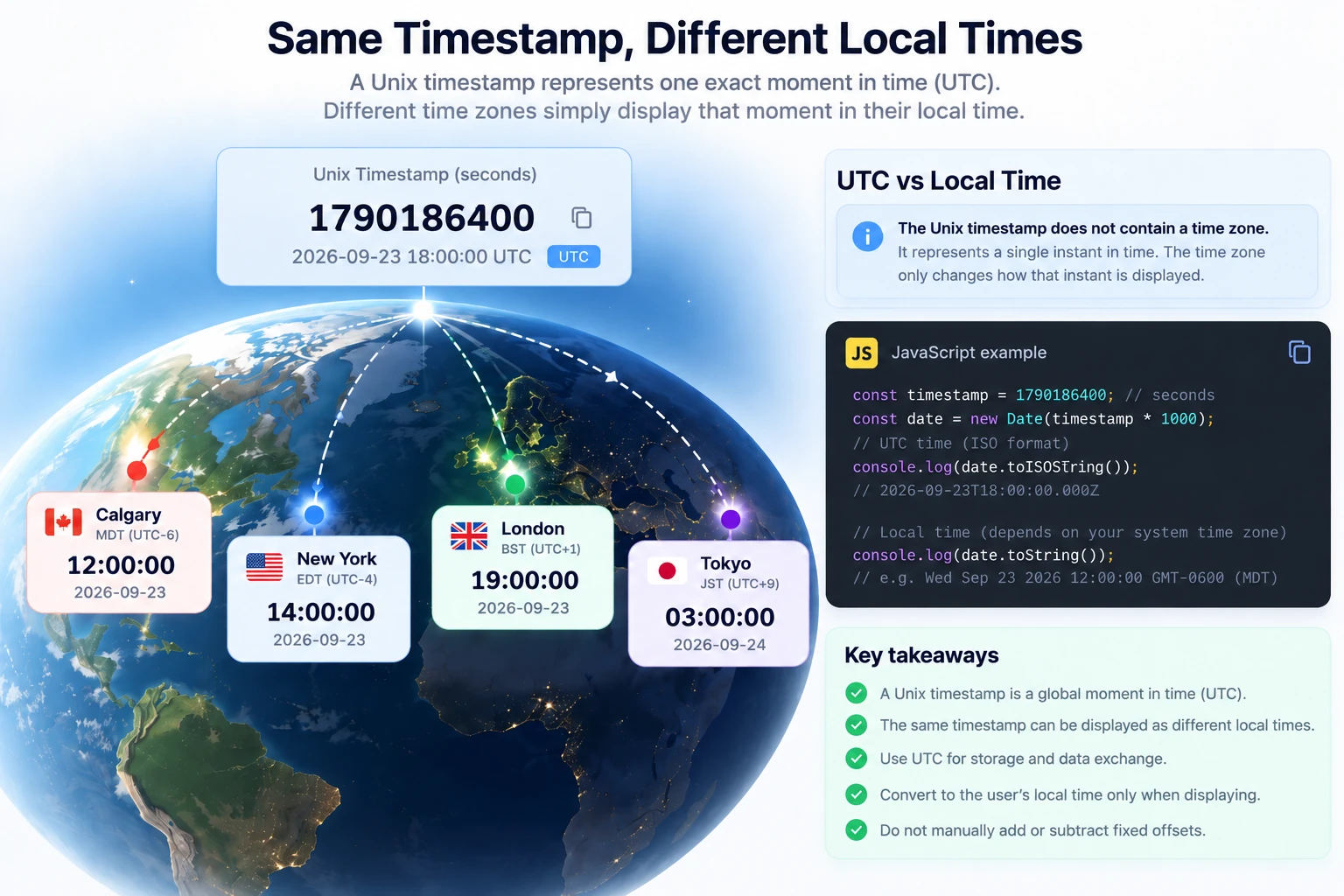
This difference is responsible for many apparent "timezone bugs". The timestamp is often correct — what changed is the way the application formatted it.
ISO 8601 and Unix timestamps are different things
Developers sometimes mix up Unix timestamps and ISO 8601 dates.
A Unix timestamp looks like 1790186400. An ISO 8601 date looks like 2026-09-23T18:00:00Z. They can both represent the same instant — the difference is representation.
Unix timestamps are compact and convenient for machines. ISO 8601 strings are easier for humans to read and can explicitly contain a UTC offset. For example, these two strings represent the same moment:
2026-09-23T12:00:00-06:00
2026-09-23T18:00:00Z
Common mistake #1: mixing seconds and milliseconds
Consider an API response:
{
  "created_at": 1790186400
}
You might write:
const createdAt = new Date(response.created_at)
This is wrong if created_at uses Unix seconds.
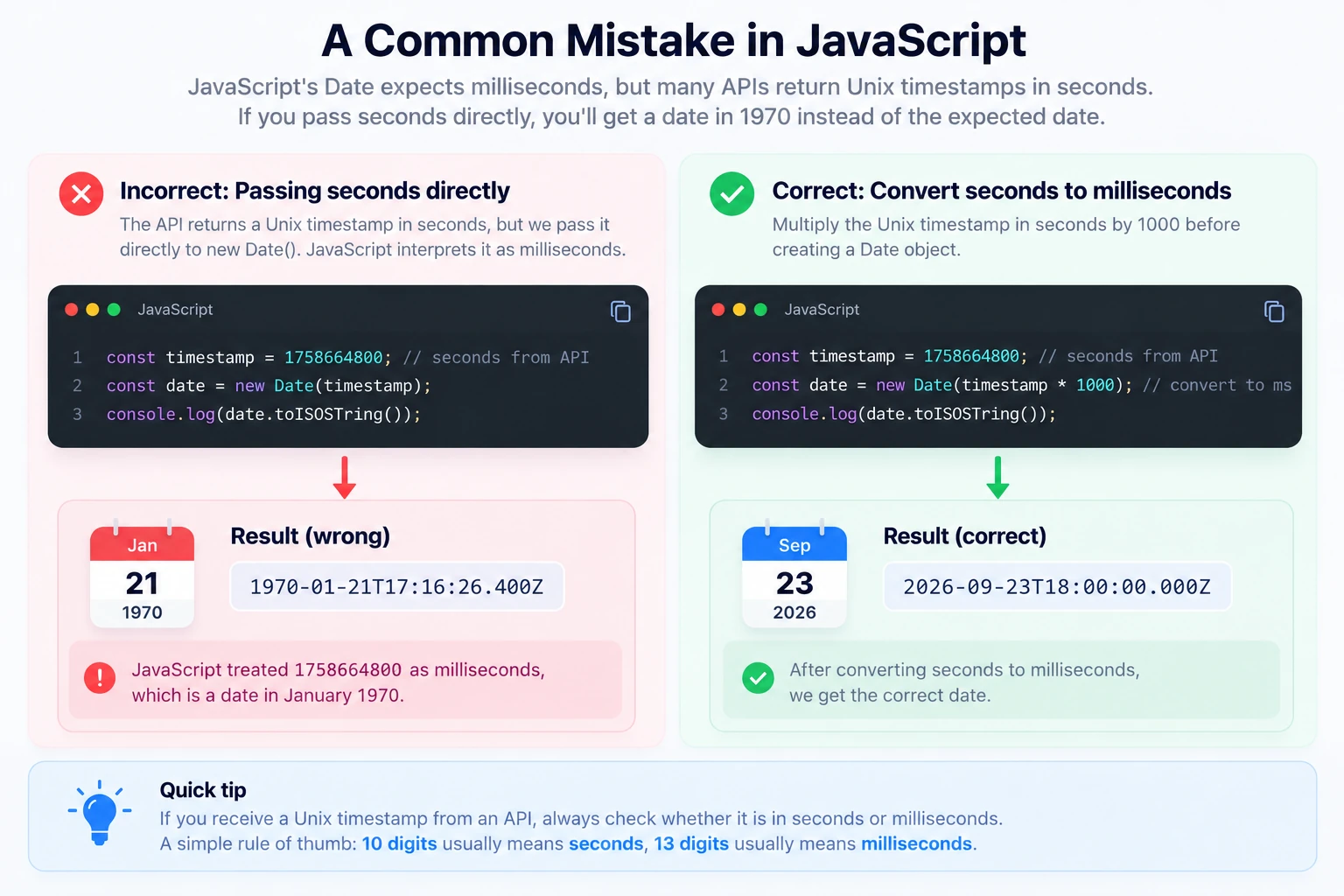
The correct version is:
const createdAt = new Date(response.created_at * 1000)
The reverse mistake happens as well. Suppose an API expects seconds, and you write:
const expiresAt = Date.now()
You send 1790186400000, but the server expects 1790186400. Read as seconds, your expiration date suddenly lands tens of thousands of years in the future.
When working with timestamps, always check the API documentation for the expected unit.
Common mistake #2: assuming the timestamp is in local time
A timestamp does not mean "12:00 Calgary time" or "14:00 New York time". It represents a global instant. The time zone matters only when converting that instant into a calendar date and clock time.
This distinction becomes especially important when users are located in different countries. For example, your database might store 1790186400, and the frontend then displays that timestamp in each user's own time zone. That is usually much safer than storing separately formatted local dates.
Common mistake #3: removing the UTC indicator
Consider this ISO string:
2026-09-23T18:00:00Z
The Z tells the parser that the value is UTC. Compare it with:
2026-09-23T18:00:00
There is no time-zone information here. Depending on the language, library, environment or parsing rules, the second value may be interpreted differently — in JavaScript, for example, a date-time string without an offset is parsed as local time.
When exchanging dates between systems, explicit time-zone information is much safer. Prefer formats such as:
2026-09-23T18:00:00Z
2026-09-23T12:00:00-06:00
instead of an ambiguous local date.
Common mistake #4: manually applying time-zone offsets
Imagine you receive a timestamp from an API and convert it to a JavaScript Date. JavaScript already knows how to display that date in the local time zone. A common mistake is then manually adding or subtracting an offset:
const date = new Date(timestamp * 1000)
date.setHours(date.getHours() - 6)
In many cases this applies the time-zone conversion twice.
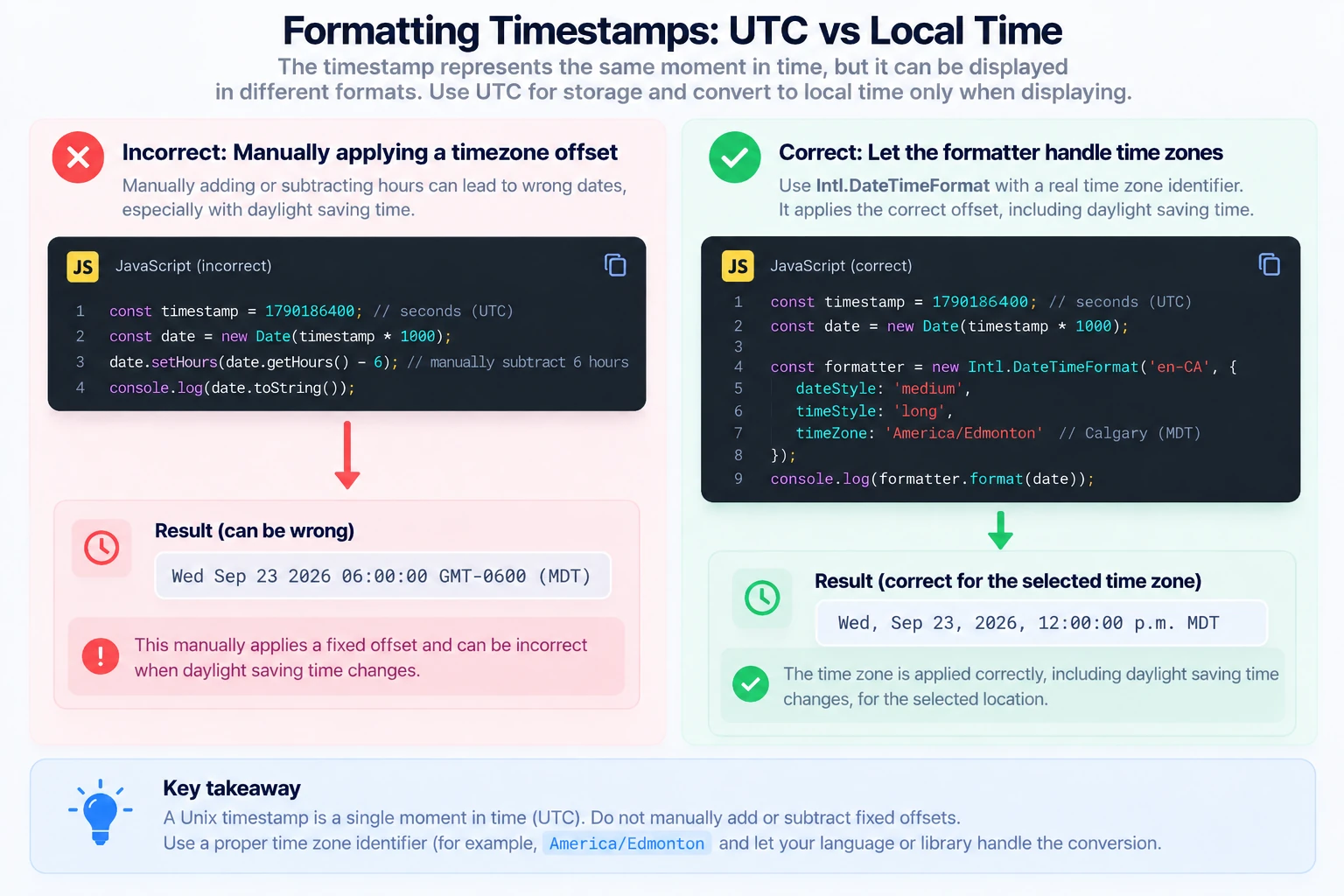
It also breaks when daylight saving time changes.
Instead, keep the underlying timestamp unchanged and apply the desired time zone only when formatting the value:
const date = new Date(timestamp * 1000)

const formatted = new Intl.DateTimeFormat('en-CA', {
  dateStyle: 'medium',
  timeStyle: 'long',
  timeZone: 'America/Edmonton'
}).format(date)

console.log(formatted)
This is much safer than manually adding or subtracting hours.
Common mistake #5: ignoring daylight saving time
Time-zone offsets are not always constant. A location might use one UTC offset during part of the year and another during the rest of the year. Because of that, code such as:
timestamp - 6 * 60 * 60
should not be used as a general way to convert UTC to a local time zone. The correct offset may depend on:
- location;
- date;
- daylight saving rules;
- historical time-zone changes.
Use an actual IANA time-zone identifier instead:
America/Edmonton
America/New_York
Europe/London
Asia/Tokyo
Modern date/time libraries and Intl.DateTimeFormat apply the appropriate rules for you.
Common mistake #6: storing local time instead of an instant
Imagine a database field contains:
2026-09-23 12:00:00
What does that mean? 12:00 where — Calgary, Toronto, London, UTC? Without additional information, the value is ambiguous.
For events that represent an exact moment, storing either a Unix timestamp or an explicitly UTC-based datetime usually avoids this problem. Values such as 1790186400 or 2026-09-23T18:00:00Z can be converted into the user's preferred local time later.
Not every date should be a Unix timestamp
There is an important exception: some dates do not represent a global instant.
A birthday is a good example. If someone was born on 1990-05-15, you care about the calendar date, not an exact UTC moment. The same applies to:
- birthdays;
- anniversaries;
- all-day calendar events;
- billing dates;
- holidays.
Converting every date into a timestamp can introduce unnecessary time-zone problems — a birthday stored as midnight UTC can show up as the previous day for users west of Greenwich. Choose the representation based on what the value actually means.
Negative Unix timestamps
Dates before January 1, 1970 are represented with negative timestamps. For example, -1 represents one second before the Unix epoch:
1969-12-31 23:59:59 UTC
Many modern systems support negative Unix timestamps, but behavior can differ between platforms and older libraries. If your application works with historical dates, test them explicitly. The lower limit of 32-bit time is covered in Unix timestamp -2147483648 and the 1901 limit.
What about the Year 2038 problem?
A signed 32-bit integer can store values only up to 2147483647. Interpreted as seconds since the Unix epoch, that limit is reached on January 19, 2038 at 03:14:07 UTC. Older systems that store timestamps as signed 32-bit integers overflow after that point.
Modern 64-bit systems do not have this practical limitation — a signed 64-bit timestamp in seconds covers a range far beyond anything normal applications need. However, the 2038 problem can still matter when working with:
- legacy operating systems;
- embedded systems;
- old databases;
- binary protocols;
- older C applications.
For what happens one second after the limit and how to test for it, read Unix timestamp 2147483647 and the Year 2038 problem.
Notable Unix timestamps
A few values come up again and again in logs, tests and bug reports. Each has its own guide:
| Timestamp | Date (UTC) | Why it matters |
|---|---|---|
-2147483648 |
1901-12-13 20:45:52 | Signed 32-bit minimum and 2038 overflow target |
0 |
1970-01-01 00:00:00 | The Unix epoch, and why buggy dates show 1970 |
1000000000 |
2001-09-09 01:46:40 | The billennium: timestamps become 10 digits |
1234567890 |
2009-02-13 23:31:30 | The famous sequential timestamp |
1700000000 |
2023-11-14 22:13:20 | Round-number milestones from 1.5 to 2.1 billion |
2000000000 |
2033-05-18 03:33:20 | The last round billion before 2038 |
2147483647 |
2038-01-19 03:14:07 | The Year 2038 problem |
4294967295 |
2106-02-07 06:28:15 | The unsigned 32-bit limit and Year 2106 |
Unix timestamp precision
Unix-style timestamps can use different levels of precision. The same instant in each unit:
Seconds
1790186400
Milliseconds
1790186400000
Microseconds
1790186400000000
Nanoseconds
1790186400000000000
This is why receiving "a timestamp" from an API is not enough information. Before parsing it, check whether the value represents seconds, milliseconds, microseconds or nanoseconds.
Converting Unix timestamps in JavaScript
Timestamp in seconds to Date
const timestamp = 1790186400
const date = new Date(timestamp * 1000)
Timestamp in milliseconds to Date
const timestamp = 1790186400000
const date = new Date(timestamp)
Current Unix timestamp in seconds
const timestamp = Math.floor(Date.now() / 1000)
Current Unix timestamp in milliseconds
const timestamp = Date.now()
Date to Unix seconds
const date = new Date()
const timestamp = Math.floor(date.getTime() / 1000)
Convert to UTC ISO format
const date = new Date(1790186400000)
console.log(date.toISOString()) // 2026-09-23T18:00:00.000Z
Debugging an unknown timestamp
Suppose you find 1790186400 in a log and do not know what it means. A useful debugging process is:
- Determine whether it is probably seconds, milliseconds, microseconds or nanoseconds.
- Convert it into UTC.
- Compare the result with the expected date.
- Check whether the system displays the result in local time.
- Look for any manually applied time-zone offsets.
- Verify how the originating API or database documents the field.
For quick debugging, use the Unix Timestamp Converter to convert between Unix timestamps and human-readable dates in any time zone.
A good rule for APIs
When designing APIs, consistency matters more than which representation you choose. You might decide that your API always returns ISO 8601 strings:
{
  "created_at": "2026-09-23T18:00:00Z"
}
Or you might use Unix timestamps:
{
  "created_at": 1790186400
}
Both approaches work. Problems begin when one endpoint returns seconds (1790186400), another returns milliseconds (1790186400000), and a third returns a local datetime (2026-09-23 12:00:00) without documenting the difference.
Pick a convention and use it consistently across your API. The same applies to tokens: the exp, iat and nbf claims in a JWT are always Unix seconds, which you can check with the JWT Decoder.
Practical rules to remember
When working with timestamps, these rules prevent most problems:
- A Unix timestamp represents an instant in time.
- Unix timestamps do not contain a time zone.
- Traditional Unix timestamps use seconds.
- JavaScript timestamps normally use milliseconds.
- Do not apply fixed UTC offsets manually when you can use a real time-zone database.
- Store exact moments in a time-zone-independent format.
- Convert to the user's local time only when displaying the value.
- Use explicit time-zone information when exchanging formatted datetime strings.
- Always verify the timestamp unit used by an API.
- Do not use timestamps for calendar-only dates unless you actually need an instant in time.
Conclusion
Unix timestamps are simple numbers, but the systems around them — time zones, daylight saving time, date formatting and different precision levels — make them surprisingly easy to misuse.
The most useful mental model is this:
A Unix timestamp identifies a point on the global timeline. A time zone only determines how that point is displayed.
Once you separate those two ideas, most timestamp problems become much easier to understand and debug. To check a value quickly, paste it into the Unix Timestamp Converter.