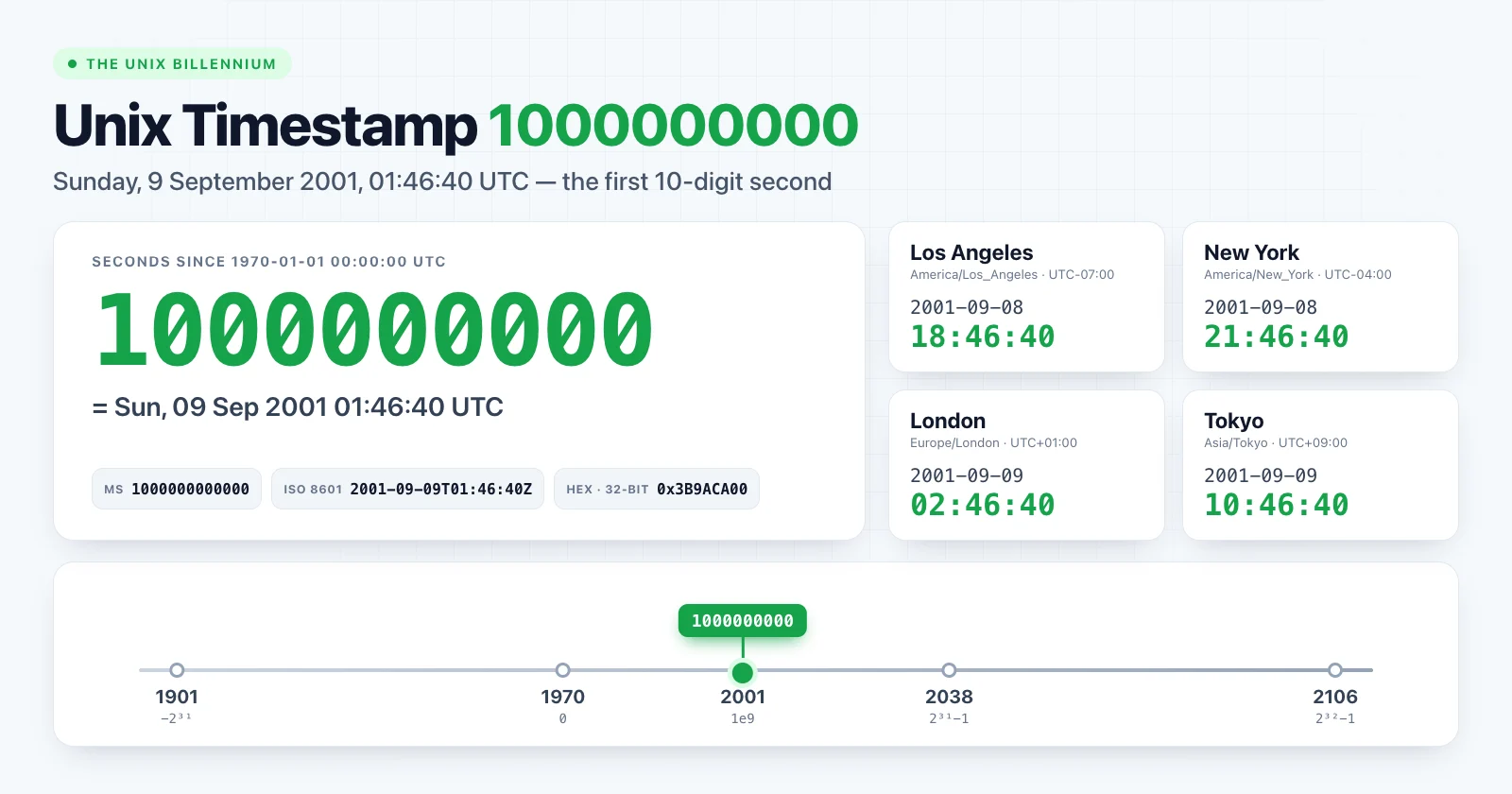
Unix timestamp 1000000000 marks the moment Unix time reached one billion seconds: Sunday, 9 September 2001, 01:46:40 UTC. Developers nicknamed it the Unix billennium.
It is also the reason for the rule of thumb every developer uses today: "a 10-digit timestamp is seconds, a 13-digit timestamp is milliseconds". Before 2001, current timestamps had only nine digits.
Unix timestamp 1000000000 at a glance
| Format | Value |
|---|---|
| Unix seconds | 1000000000 |
| Unix milliseconds | 1000000000000 |
| ISO 8601 (UTC) | 2001-09-09T01:46:40Z |
| RFC 1123 | Sun, 09 Sep 2001 01:46:40 GMT |
| Day of week (UTC) | Sunday |
| Hex (32-bit) | 0x3B9ACA00 |
Open it in the Unix Timestamp Converter to see every format side by side.
The billennium in different time zones
Because the moment fell early on a Sunday in UTC, it was still Saturday evening across the Americas:
| Location | Local date and time | Offset |
|---|---|---|
| Los Angeles | 2001-09-08 18:46:40 | UTC−07:00 |
| New York | 2001-09-08 21:46:40 | UTC−04:00 |
| London | 2001-09-09 02:46:40 | UTC+01:00 |
| Berlin | 2001-09-09 03:46:40 | UTC+02:00 |
| Kolkata | 2001-09-09 07:16:40 | UTC+05:30 |
| Tokyo | 2001-09-09 10:46:40 | UTC+09:00 |
| Sydney | 2001-09-09 11:46:40 | UTC+10:00 |
This is a useful example for tests: a single instant with two different calendar dates, depending on the viewer's time zone. If your application groups events "by day", decide explicitly which time zone defines the day.
From 9 digits to 10
The last 9-digit timestamp was 999999999, one second earlier at 01:46:39 UTC. From the billennium onward, every current Unix timestamp in seconds has 10 digits, and it will stay that way for a long time:
| Digits (seconds) | First value | Date (UTC) |
|---|---|---|
| 9 | 100000000 |
1973-03-03 09:46:40 |
| 10 | 1000000000 |
2001-09-09 01:46:40 |
| 11 | 10000000000 |
2286-11-20 17:46:40 |
Millisecond timestamps crossed from 12 to 13 digits at the same instant, since 1000000000000 ms is the same moment. That is why the heuristic works so well today:
function guessUnit(value) {
  const digits = String(Math.trunc(Math.abs(value))).length
  if (digits <= 10) return 'seconds'
  if (digits <= 13) return 'milliseconds'
  return 'microseconds or nanoseconds'
}
Keep in mind that this is a guess, not validation. A timestamp in seconds from 1990 has nine digits, and a small millisecond value such as a duration can have any length. When you control the API, document the unit instead of relying on digit count. The main guide explains how to tell seconds from milliseconds.
Bugs the extra digit exposed
Numbers do not care about digit counts, but text does. The billennium broke code that treated timestamps as strings.
Text sorting
Sorted as strings, a 10-digit value comes before a 9-digit one because "1" is less than "9":
const asText = ['999999999', '1000000000'].sort()
// [ '1000000000', '999999999' ]  wrong order

const asNumbers = [999999999, 1000000000].sort((a, b) => a - b)
// [ 999999999, 1000000000 ]  correct
The same problem appears with timestamps used in file names, cache keys, log lines or database columns declared as text. Anything that orders them alphabetically will misplace values from before and after 2001.
The fix is to store timestamps as numbers, or to zero-pad them to a fixed width that you will never exceed. ISO 8601 strings such as 2001-09-09T01:46:40Z also sort correctly as text, as long as every value uses the same format and time zone.
Fixed-width fields
Formats that reserved exactly nine characters for a timestamp could not hold the new value. Truncating 1000000000 to nine characters produces 100000000, which is a date in 1973, not a crash. Silent data corruption like that is harder to notice than an error.
Validation rules
Regular expressions such as ^\d{9}$ for "a Unix timestamp" stopped matching. Today's equivalent mistake is ^\d{10}$, which rejects valid timestamps before 2001 and every negative timestamp. A more honest check is simply "an integer within the range you support".
Converting 1000000000 in code
JavaScript
new Date(1000000000 * 1000).toISOString() // "2001-09-09T01:46:40.000Z"
Python
from datetime import datetime, timezone

datetime.fromtimestamp(1_000_000_000, tz=timezone.utc).isoformat()
# '2001-09-09T01:46:40+00:00'
Shell
date -u -d @1000000000     # GNU/Linux
date -u -r 1000000000      # macOS / BSD
SQL (PostgreSQL)
SELECT to_timestamp(1000000000) AT TIME ZONE 'UTC';
-- 2001-09-09 01:46:40
Where the billennium sits on the timeline
One billion seconds is about 31.7 years. The next round milestones came much faster in relative terms. Unix timestamp 1234567890 arrived in February 2009, and the series of 1500000000, 1600000000 and 1700000000 followed every three years or so. The next billion, 2000000000, falls in May 2033.
Summary
Unix timestamp 1000000000 is 2001-09-09 01:46:40 UTC, the moment Unix time gained its tenth digit. It is the origin of the 10-digit/13-digit rule of thumb, and a reminder that timestamps should be stored and sorted as numbers, not text.
Check any value in the Unix Timestamp Converter, or read Unix Timestamps Explained for the fundamentals.