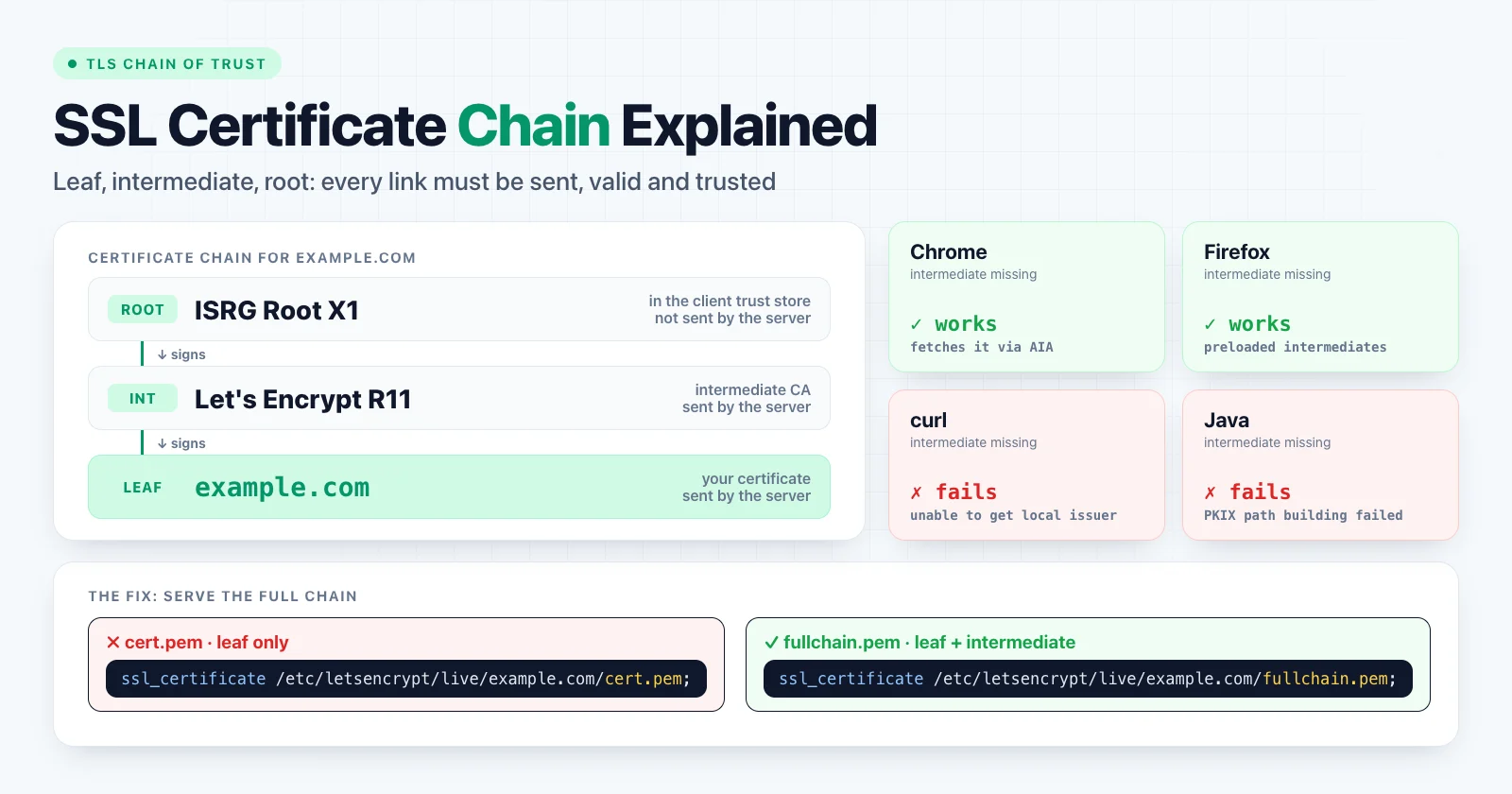
An SSL certificate chain (more precisely, a TLS certificate chain) is the list of certificates that links your site's certificate to a root certificate the client already trusts. Your leaf certificate is signed by an intermediate certificate, and the intermediate is signed by the root. The client checks each signature in turn. If any link is missing or invalid, the connection fails with an "untrusted certificate" error.
The most common chain problem is simple: the server sends its own certificate but not the intermediate. Browsers often hide this, while curl, APIs and mobile apps fail with errors such as unable to get local issuer certificate. The fix is to install the full chain on the server.
The three types of certificate
ISRG Root X1                    root: in the client's trust store, not sent
  └─ signs  R11                 intermediate: sent by your server
       └─ signs  example.com    leaf: your certificate, sent by your server
| Certificate | Also called | Who has it | Typical lifetime | Sent by your server |
|---|---|---|---|---|
| Leaf | End-entity, server certificate | You | 90 to 200 days | Yes |
| Intermediate | Subordinate or issuing CA | The certificate authority (CA) | A few years | Yes |
| Root | Trust anchor | Browsers and operating systems | 15 to 25 years | No |
The leaf certificate
The leaf is the certificate issued for your domain. It contains your hostnames in the Subject Alternative Name (SAN) list, your public key, the validity period, and the name of the CA that signed it in the Issuer field.
Leaf certificates are getting shorter-lived. Under CA/Browser Forum rules, public TLS certificates issued from March 2026 may be valid for at most 200 days, falling to 100 days in 2027 and 47 days in 2029. Automated renewal is no longer optional.
Intermediate certificates
CAs almost never sign leaf certificates with their root key. The root signs one or more intermediate certificates, and those sign your leaf. This keeps the valuable root key offline, and lets the CA replace or revoke an intermediate without touching the root. CAs rotate intermediates regularly, so the intermediate that signs your next certificate may be different from the one you have today.
The root certificate
The root signs itself. It is trusted because it ships in a trust store: the Mozilla root store (used by Firefox and many Linux distributions), the Apple, Microsoft and Android stores, and the Chrome Root Store. A chain is only valid if it ends at a root in the store of the client that is connecting.
How a client validates the chain
During the TLS handshake, the server sends its leaf certificate and the intermediates. The client then:
- Builds a path from the leaf to a trusted root by matching each certificate's Issuer to the Subject of the next one (and the Authority Key Identifier to the Subject Key Identifier).
- Verifies each signature with the public key of the certificate above it.
- Checks validity dates for every certificate in the path, not only the leaf.
- Checks the hostname against the leaf's SAN entries.
- Checks constraints and usage, for example that the intermediate is allowed to act as a CA.
- Optionally checks revocation, using CRLs or OCSP.
If every step passes, the connection is trusted.
The most common failure: a missing intermediate
A server that sends only the leaf certificate forces the client to find the intermediate on its own. Clients behave very differently here:
| Client | Missing intermediate |
|---|---|
| Chrome, Edge, Safari | Usually works: fetches it from the leaf's AIA URL or uses a cached copy |
| Firefox | Usually works: ships a preloaded list of known intermediates |
| curl, wget, OpenSSL | Fails |
| Python, Node.js, Go, Java, .NET HTTP clients | Fails (by default) |
| Many Android and iOS apps, IoT devices | Often fails |
| Webhooks and API integrations | Usually fails |
That is why the site "works for me" in a browser while monitoring, payment webhooks or a mobile app break. The AIA (Authority Information Access) extension in the leaf contains a URL where the intermediate can be downloaded, but only some clients use it.
Error messages that mean a broken chain
| Client | Error |
|---|---|
| curl | curl: (60) SSL certificate problem: unable to get local issuer certificate |
| OpenSSL | verify error:num=20:unable to get local issuer certificate and num=21:unable to verify the first certificate |
| Python | [SSL: CERTIFICATE_VERIFY_FAILED] certificate verify failed: unable to get local issuer certificate |
| Node.js | UNABLE_TO_VERIFY_LEAF_SIGNATURE (unable to verify the first certificate) |
| Java | PKIX path building failed ... unable to find valid certification path to requested target |
| Go | x509: certificate signed by unknown authority |
| Chrome | NET::ERR_CERT_AUTHORITY_INVALID |
The same messages also appear when a certificate comes from a private CA that the client does not trust, so check the chain before you change the client.
How to check a certificate chain
With a web tool: the SSL Certificate Checker connects to your host, shows every certificate the server presents with its issuer and expiry date, and tells you whether the chain reaches a trusted root. Unlike a browser, it does not quietly fill in a missing intermediate.
With OpenSSL:
openssl s_client -connect example.com:443 -servername example.com -showcerts </dev/null
Look at the Certificate chain section at the top of the output:
Certificate chain
 0 s:CN = example.com
   i:C = US, O = Let's Encrypt, CN = R11
 1 s:C = US, O = Let's Encrypt, CN = R11
   i:C = US, O = Internet Security Research Group, CN = ISRG Root X1
---
Verify return code: 0 (ok)
s:is the subject andi:is the issuer. Each certificate'si:should match the next certificate'ss:.- Certificate
0must be your leaf. - If only certificate
0is listed and the result isVerify return code: 21 (unable to verify the first certificate), the intermediate is missing.
Always pass -servername. Without it, a server that hosts several sites may return a different, default certificate. To check a certificate file before deploying it:
openssl verify -untrusted chain.pem cert.pem
How to fix a missing intermediate
Configure the server with a file that contains your leaf certificate first, followed by the intermediates. Most CAs provide this as a "bundle", "chain" or "full chain" file.
Nginx:
ssl_certificate     /etc/letsencrypt/live/example.com/fullchain.pem;
ssl_certificate_key /etc/letsencrypt/live/example.com/privkey.pem;
With Certbot, fullchain.pem contains the leaf and the intermediate, while cert.pem contains only the leaf. Pointing ssl_certificate at cert.pem is the classic cause of a broken chain.
Apache 2.4.8 and later:
SSLCertificateFile    /etc/letsencrypt/live/example.com/fullchain.pem
SSLCertificateKeyFile /etc/letsencrypt/live/example.com/privkey.pem
SSLCertificateChainFile is deprecated since Apache 2.4.8. Put the chain in SSLCertificateFile instead.
Building a chain file by hand: if your CA sends separate files, concatenate them in order, leaf first:
cat example_com.crt intermediate.crt > fullchain.pem
Load balancers and CDNs: managed certificates include the chain automatically. When you upload your own certificate, for example to AWS Certificate Manager, paste the intermediates into the separate certificate chain field.
Reload the server and check again with the SSL Checker or openssl s_client.
Other chain problems
Expired intermediate or root
Every certificate in the path has its own expiry date. An intermediate or cross-signed root can expire while your leaf is still valid. The best-known case was on 30 September 2021, when the old DST Root CA X3 that cross-signed Let's Encrypt expired. Up-to-date clients built a path to ISRG Root X1 instead, but older clients with outdated trust stores or OpenSSL 1.0.x failed. The fix on the client side is to update the CA bundle or the operating system.
Wrong order
TLS 1.2 requires the leaf first, then each issuer in order. TLS 1.3 only requires the leaf to come first, and most modern clients tolerate any order, but some older or embedded clients do not. Keep the standard order: leaf, then intermediates, then nothing else.
Sending the root or unrelated certificates
Including the root is unnecessary: clients ignore it and it adds bytes to every handshake. Including an old or unrelated intermediate can confuse strict clients. Send exactly the leaf and the intermediates that link it to the root.
Self-signed or private CA certificates
Internal services often use a private CA. Clients reject these chains with errors such as self signed certificate in certificate chain unless the private root is added to their trust store. Add it explicitly, for example with NODE_EXTRA_CA_CERTS in Node.js, REQUESTS_CA_BUNDLE in Python requests, or --cacert in curl.
Do not "fix" chain errors by disabling verification with
curl -k,verify=FalseorrejectUnauthorized: false. That removes protection against man-in-the-middle attacks instead of fixing the chain.
Hostname mismatch
A perfectly chained certificate still fails if the hostname is not in its SAN list. Chrome reports NET::ERR_CERT_COMMON_NAME_INVALID, and curl reports no alternative certificate subject name matches target host name. This is not a chain problem: reissue the certificate with the correct names, or check whether DNS points to the wrong server with the DNS Lookup. After a migration, the guide to DNS propagation explains why some users can still reach the old host.
Summary
A certificate chain links your leaf certificate through one or more intermediates to a root the client already trusts. Your server must send the leaf and the intermediates, in order, and nothing else. When a site works in Chrome but fails in curl, Java, Python or a mobile app, a missing intermediate is almost always the cause, and the fix is to install the full chain file.
Check any host with the SSL Certificate Checker, which shows every certificate in the chain with its issuer and expiry date.