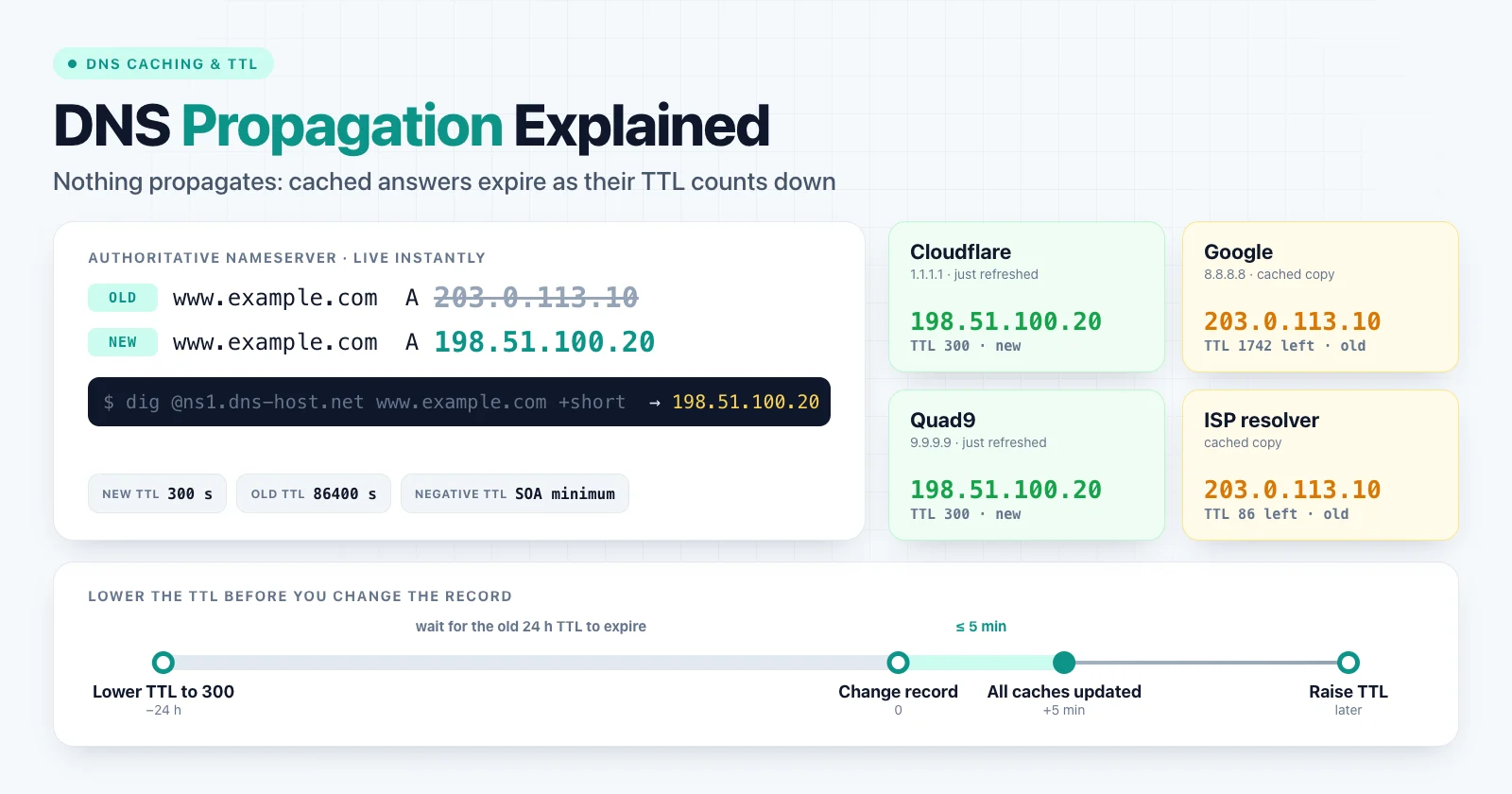
DNS propagation is the time it takes for a DNS change to become visible everywhere. The name is misleading: nothing is pushed across the internet. Your authoritative nameserver serves the new record immediately, but recursive resolvers keep serving their cached copy of the old record until its TTL expires.
In practice, a changed record is visible everywhere within the TTL it had before the change, often 5 minutes to 24 hours. Nameserver changes at the registrar can take up to 48 hours. With a bit of planning, most changes are visible globally in minutes.
How long DNS propagation takes
| Change | What controls the delay | Typical worst case |
|---|---|---|
| Edit an A, AAAA, CNAME, MX or TXT record | The old record's TTL | 5 minutes to 24 hours |
| Add a record that did not exist | Negative caching TTL from the SOA, if it was queried | Instant to a few hours |
| Delete a record | The old record's TTL | 5 minutes to 24 hours |
| Change nameservers at the registrar | TLD delegation TTL (.com uses 172800 s) |
Up to 48 hours |
| Change DNSSEC DS records | DS record TTL at the TLD (.com uses 86400 s) |
Up to 24 hours |
| Transfer a domain to a new registrar | Nothing, if the nameservers stay the same | No DNS delay |
The often-quoted "24 to 48 hours" is a conservative worst case, mostly relevant to nameserver changes. It is not a rule for ordinary record edits.
Why nothing actually propagates
A DNS lookup rarely reaches your authoritative nameserver. It goes through several layers, and each one can cache the answer:
- The browser asks the operating system, or its own built-in resolver.
- The operating system checks its cache and the
hostsfile. - A recursive resolver answers: your ISP's resolver, a corporate resolver, or a public one such as Cloudflare
1.1.1.1, Google8.8.8.8or Quad99.9.9.9. - Only on a cache miss does the resolver ask the authoritative nameserver for your zone.
When you change a record, step 4 has the new value at once. Every resolver that answered from cache in step 3 keeps returning the old value until its copy expires. So "propagation" really means thousands of independent caches expiring at different times. Large public resolvers are also spread across many locations with separate caches, which is why two people using the same resolver in different cities can see different answers for a while.
TTL: the setting that controls the wait
TTL (Time To Live) is a number of seconds attached to every DNS record. It tells resolvers how long they may cache the answer.
www.example.com.   300   IN   A   203.0.113.10
;                  ^^^
;                  TTL in seconds: resolvers may cache this for 5 minutes
| TTL | Seconds | Good for |
|---|---|---|
| 5 min | 300 | Records you are about to change, failover, migrations |
| 1 hour | 3600 | A sensible default for most records |
| 1 day | 86400 | Stable records such as NS, or MX that never changes |
The critical detail: the TTL that decides how long a change takes is the TTL of the old record. If your A record had a TTL of 86400 and a resolver cached it an hour ago, that resolver keeps the old IP for the next 23 hours, whatever you change now.
Lower the TTL before a change
This is the single most effective way to make DNS changes fast:
- At least one old TTL ahead (a day ahead for a 24-hour TTL), lower the TTL of the records you plan to change to
300. - Wait for the old TTL to pass, so every resolver has picked up the short TTL.
- Make the change. Caches now hold the old value for at most five minutes.
- Keep the old server running until traffic to it stops.
- Raise the TTL again once the new setup is stable.
Lowering the TTL at the same moment you change the record does nothing for resolvers that already cached the old record under the old, long TTL. Plan the TTL change in advance.
Some resolvers enforce their own minimum or maximum cache time, so a few may keep an answer slightly longer than your TTL. Very low TTLs, such as 30 seconds, also increase query load and slow down first visits, so use them only for as long as you need them.
Negative caching: why new records seem slow
Resolvers also cache the answer "this name does not exist" (NXDOMAIN) or "no record of this type". This is negative caching (RFC 2308). Its duration comes from your zone's SOA record: the lower of the SOA record's own TTL and its last field, the minimum.
example.com.  3600  IN  SOA  ns1.dns-host.net. hostmaster.example.com. (
                             2026092501 ; serial
                             7200       ; refresh
                             3600       ; retry
                             1209600    ; expire
                             300 )      ; minimum: negative caching TTL
With this SOA, a resolver that asked for api.example.com before you created it remembers "does not exist" for up to 5 minutes. Some DNS hosts use an hour or more, and resolvers usually cap negative caching at a few hours. If you test a new subdomain in the browser before adding it, you may be waiting for your own negative cache. The DNS Lookup tool shows the SOA record for any domain.
Nameserver changes take longer
Moving a domain to a new DNS host means changing its NS records at the registrar. That change is published by the TLD's servers, which typically use long TTLs: .com and .net delegations have a TTL of 172800 seconds, or 48 hours. Resolvers that cached the old delegation keep asking the old nameservers until it expires.
To migrate nameservers without downtime:
- Copy the full zone to the new DNS host first, including MX, TXT, DKIM and verification records. Check it by querying the new nameservers directly.
- Keep the old DNS host serving the same records for at least 48 hours after the switch.
- Handle DNSSEC first. If the domain is signed, remove the DS record at the registrar or set it up for the new provider before switching. A DS record that does not match the new provider's keys makes validating resolvers return
SERVFAIL, which looks like a total outage.
The WHOIS Lookup shows which nameservers the registrar currently has on record.
Where DNS answers are cached
| Layer | How to clear it |
|---|---|
| Chrome and Edge | Open chrome://net-internals/#dns and click Clear host cache |
| macOS | sudo dscacheutil -flushcache; sudo killall -HUP mDNSResponder |
| Windows | ipconfig /flushdns |
| Linux with systemd-resolved | resolvectl flush-caches |
| Home router | Restart it, or change the DNS server it hands out |
| Google Public DNS | Use the Flush Cache page on the Google Public DNS site |
| Cloudflare 1.1.1.1 | Use the Purge Cache page on the 1.1.1.1 site |
| ISP and corporate resolvers | Cannot be cleared by you; wait for the TTL |
| Applications | Restart the process (see below) |
Some applications cache DNS on their own. Nginx resolves hostnames in proxy_pass once at startup unless you configure a resolver and use a variable, so it can keep sending traffic to an old IP until you reload it. The JVM caches lookups according to networkaddress.cache.ttl. Also check the hosts file (/etc/hosts or C:\Windows\System32\drivers\etc\hosts) for a forgotten override.
How to check DNS propagation
There is no single global DNS state, so "has it propagated?" really means "do the resolvers my users rely on return the new value?". Check it step by step:
1. Find the authoritative nameservers.
dig NS example.com +short
2. Ask one of them directly. This confirms the source is correct. If it still shows the old value, the problem is your change, not caching.
dig @ns1.dns-host.net www.example.com A +norecurse
3. Ask several public resolvers and compare the answers:
dig @1.1.1.1 www.example.com A +noall +answer
dig @8.8.8.8 www.example.com A +noall +answer
dig @9.9.9.9 www.example.com A +noall +answer
www.example.com. 187 IN A 198.51.100.20
4. Read the TTL column. A value lower than your configured TTL means the resolver is counting down a cached copy. A value equal to your full TTL means it has just fetched the record from your nameserver.
On Windows, use nslookup www.example.com 8.8.8.8. For a quick check without a terminal, the DNS Lookup tool shows what our resolver currently returns for A, AAAA, MX, TXT, NS and SOA records.
Keep your expectations honest: no tool can see every resolver cache on the internet. Checking the authoritative server plus a few major public resolvers tells you what most users will see.
Can you speed up DNS propagation?
- Yes: lower the TTL in advance, clear your own browser and OS caches, and request a purge from Google Public DNS and Cloudflare for the affected name.
- Yes: for migrations, keep the old server or old DNS host running, so users with stale caches still reach a working service.
- No: you cannot flush ISP or corporate resolvers, and lowering the TTL after the change does not help.
- No: repeatedly changing the record or contacting the registrar does not make caches expire sooner.
Common problems after a DNS change
The site works for me but not for others
Different users sit behind different resolvers. Compare public resolvers as shown above, and remember that your own device may have the new record simply because you never cached the old one.
Visitors still reach the old server
Check the old record's TTL, then look for caches outside DNS: a hosts file entry, a CDN or proxy with the old origin IP configured, or an application that resolved the name at startup.
Email still goes to the old mail server
Sending servers cache MX records like any resolver, and they retry queued messages for up to several days. Keep the old mail server accepting mail until its traffic stops. If you also change SPF or DMARC during the move, see SPF, DKIM and DMARC explained.
HTTPS errors after moving to a new host
If the new server does not have a valid certificate yet, users who already see the new IP get certificate warnings. Issue the certificate before switching DNS, or use DNS-based validation. The SSL Checker shows which certificate each host presents. For chain-related errors, see how to read an SSL certificate chain.
SERVFAIL after changing DNS providers
This is almost always a DNSSEC mismatch: the registrar still publishes a DS record for the old provider's keys. Remove or update the DS record at the registrar.
Summary
DNS changes are live on your authoritative nameserver immediately. What you wait for is cached copies of the old answer to expire, and the old record's TTL decides how long that takes. Lower the TTL before planned changes, create records before anyone queries them, keep old servers running during migrations, and verify with the authoritative server plus several public resolvers.
To check records now, use the DNS Lookup, and confirm registrar nameservers with the WHOIS Lookup.