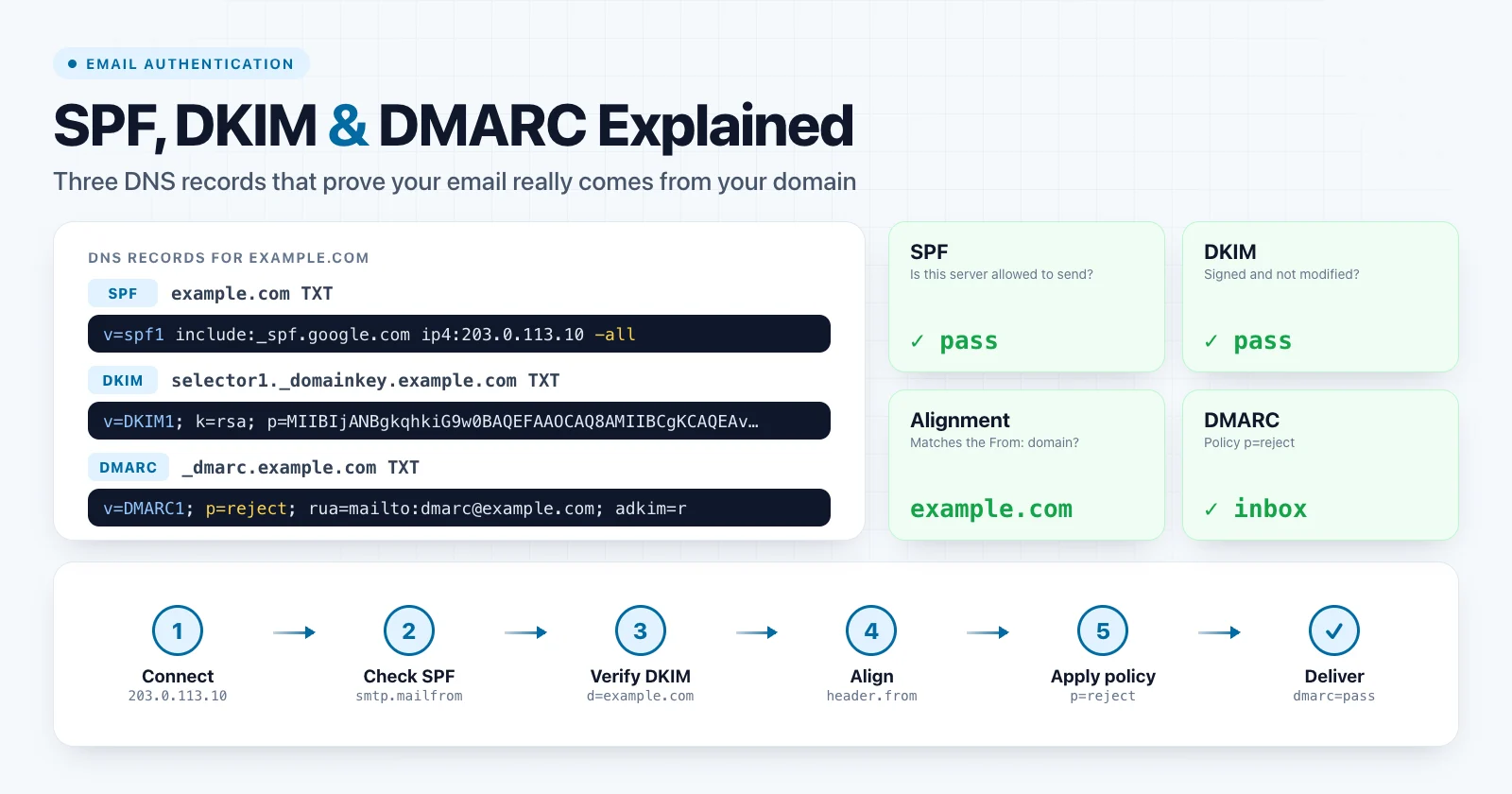
SPF, DKIM and DMARC are three DNS records that let a receiving mail server check whether a message really comes from your domain. SPF lists the servers allowed to send your mail. DKIM signs each message with a key published in DNS. DMARC checks that at least one of them passed for the domain in the visible From: address, and tells the receiver what to do when neither did.
Without them, anyone can send email that claims to be from your domain, and receivers have no strong reason to trust your real mail. Since 2024, Gmail and Yahoo require them from bulk senders, and missing records are one of the most common causes of mail going to spam.
SPF, DKIM and DMARC at a glance
| SPF | DKIM | DMARC | |
|---|---|---|---|
| Question it answers | Is this server allowed to send? | Is the message signed and unchanged? | Does a passing check match the From domain? |
| DNS name | example.com |
selector._domainkey.example.com |
_dmarc.example.com |
| Record type | TXT | TXT (sometimes a CNAME to the provider) | TXT |
| Checks which domain | Envelope sender (Return-Path) | The d= domain in the signature |
The visible From: domain |
| Survives forwarding | Usually no | Usually yes | Yes, if DKIM survives |
| Tells receivers what to do | No | No | Yes: none, quarantine or reject |
You can check all three for any domain with the SPF Checker, DKIM Checker and DMARC Checker.
SPF: which servers may send for your domain
SPF (Sender Policy Framework, RFC 7208) is a single TXT record at your domain that lists the servers permitted to send mail for it. The receiver takes the IP address of the connecting server and checks whether your record allows it.
example.com. 3600 IN TXT "v=spf1 ip4:203.0.113.10 include:_spf.google.com include:mailgun.org -all"
Read from left to right, this record says: the server at 203.0.113.10 may send, Google Workspace and Mailgun may send, and everything else should fail.
SPF mechanisms and qualifiers
| Part | Meaning | Costs a DNS lookup |
|---|---|---|
v=spf1 |
Marks the record as SPF. Must come first. | — |
ip4: / ip6: |
An address or CIDR range, such as ip4:203.0.113.0/24. |
No |
include: |
Also allow everything the other domain's SPF record allows. | Yes |
a / mx |
Allow the IPs of the domain's A/AAAA or MX hosts. | Yes |
exists: |
Advanced macro-based check, mostly used by large providers. | Yes |
ptr |
Reverse-DNS match. Deprecated; do not use. | Yes |
redirect= |
Use another domain's SPF record instead of this one. | Yes |
-all |
Fail anything not matched. | No |
~all |
Softfail: accept but treat as suspicious. | No |
?all |
Neutral: no opinion. | No |
+all |
Allow the whole internet. Never use this. | No |
The prefix before a mechanism is its qualifier. + (pass) is the default, so include:mailgun.org means +include:mailgun.org. Once DMARC is in place, ~all and -all behave almost the same in practice, because DMARC makes the final decision. -all is still the clearer choice for a domain whose senders are fully known.
The 10 DNS lookup limit
To stop SPF from being abused for DNS amplification, a receiver may perform at most 10 DNS lookups while evaluating your record, including lookups inside nested include: records. ip4, ip6 and all are free. If the limit is exceeded, the result is permerror, and receivers treat SPF as failed.
This limit is easy to hit. Google Workspace, Microsoft 365, a CRM, a helpdesk and a newsletter platform can use most of it on their own. The SPF Checker expands every include and counts the lookups for you.
Two other rules cause the same permerror:
- Only one SPF record per domain. Two TXT records that both start with
v=spf1are invalid. Merge them into one. - Syntax errors, such as a typo in a mechanism name or a missing space.
What SPF does not protect
SPF checks the envelope sender (also called the Return-Path or MAIL FROM), a technical address used for bounces. The recipient never sees it. The address they do see is in the From: header, and SPF does not look at it. A spammer can pass SPF for their own domain and still put your domain in the From: line.
SPF also breaks on forwarding. When a message is forwarded, the forwarding server sends it from its own IP address, which is not in your record. Both gaps are why SPF alone is not enough.
DKIM: a signature that proves the message is yours
DKIM (DomainKeys Identified Mail, RFC 6376) signs outgoing messages with a private key. The receiver finds the matching public key in DNS and verifies the signature. A valid signature proves that the message was signed by the domain in the d= tag and that the signed headers and body were not changed in transit.
The signature is added as a header:
DKIM-Signature: v=1; a=rsa-sha256; d=example.com; s=selector1;
    h=from:to:subject:date:message-id; bh=2jUSOH9NhtVGCQWNr9BrIAPreKQjO6Sn7XIkfJVOzv8=;
    b=Lx8r3Vq...
The public key is published under the selector from s=:
selector1._domainkey.example.com. 3600 IN TXT "v=DKIM1; k=rsa; p=MIIBIjANBgkqhkiG9w0BAQEFAAOCAQ8AMIIBCgKCAQEA..."
v=DKIM1marks the record as a DKIM key.k=rsais the key type.ed25519also exists, but not all receivers support it, so RSA is still required.p=is the Base64-encoded public key. An emptyp=means the key has been revoked.
Because the signature travels inside the message, DKIM survives normal forwarding. That makes it the more reliable half of DMARC.
DKIM selectors
A selector lets one domain publish several keys at once, one per sending service or per key generation. There is no DNS query that lists all selectors for a domain. To find one, open a message you received, look at the DKIM-Signature header and read the s= value.
| Provider | Typical selectors |
|---|---|
| Google Workspace | google |
| Microsoft 365 | selector1, selector2 |
| Amazon SES | Three random tokens (CNAMEs) |
| SendGrid | s1, s2 |
| Mailchimp / Mandrill | k1, k2, k3 |
Selectors can differ per account, so treat this table as a starting point. Once you know the selector, the DKIM Checker fetches the record and reports the key type and length.
Key length and rotation
- Use 2048-bit RSA keys. 1024-bit keys still work but are considered weak, and major receivers treat signatures made with shorter keys as if the message were unsigned.
- A 2048-bit key is longer than the 255-character limit for a single TXT string. DNS providers split it into several quoted strings in one record, which is valid.
- Rotate keys by publishing a new selector, switching signing to it, then leaving the old key in DNS for a few days so messages still in transit can be verified. After that, revoke the old key with an empty
p=.
DMARC: the policy that ties SPF and DKIM together
DMARC (Domain-based Message Authentication, Reporting and Conformance, RFC 7489) does three things: it checks alignment with the From: domain, it tells receivers what to do when a message fails, and it asks them to send you reports.
The record is always published at the _dmarc subdomain:
_dmarc.example.com. 3600 IN TXT "v=DMARC1; p=reject; rua=mailto:[email protected]; adkim=r; aspf=r"
A DMARC record placed at example.com itself is ignored. This is a common setup mistake.
DMARC alignment
A message passes DMARC when at least one of these is true:
- SPF passes and the envelope sender domain aligns with the From: domain, or
- DKIM passes and the signature's
d=domain aligns with the From: domain.
Alignment is relaxed by default: the two domains only need to share the same organizational domain. Strict alignment (adkim=s, aspf=s) requires an exact match.
| From: domain | Authenticated domain | Relaxed | Strict |
|---|---|---|---|
example.com |
example.com |
Pass | Pass |
example.com |
mail.example.com |
Pass | Fail |
example.com |
bounces.esp-provider.net |
Fail | Fail |
The last row is the classic "SPF passes but DMARC fails" case. The email service's own bounce domain passes SPF, but it has nothing to do with your From: domain.
DMARC tags
| Tag | Example | Meaning |
|---|---|---|
v |
v=DMARC1 |
Required, and must come first. |
p |
p=quarantine |
Required. Policy for the domain: none, quarantine, reject. |
sp |
sp=reject |
Policy for subdomains. Defaults to the value of p. |
rua |
rua=mailto:[email protected] |
Where to send daily aggregate reports. |
ruf |
ruf=mailto:[email protected] |
Where to send failure reports. Few receivers still send them. |
pct |
pct=25 |
Apply the policy to only this percentage of failing mail. Default 100. |
adkim |
adkim=s |
DKIM alignment: r relaxed (default) or s strict. |
aspf |
aspf=s |
SPF alignment: r relaxed (default) or s strict. |
fo |
fo=1 |
When to generate failure reports. |
If reports go to a mailbox on a different domain, that domain must authorize it with a TXT record such as example.com._report._dmarc.reports.example.net containing v=DMARC1. Hosted DMARC reporting services usually set this up for you.
p=none, p=quarantine and p=reject
p=none: monitoring only. Nothing is blocked, but you receive reports. It does not protect your domain from spoofing.p=quarantine: failing messages go to the spam or junk folder.p=reject: failing messages are refused during delivery. This is the goal for a domain you control fully.
The DMARC Checker shows the policy, subdomain policy, alignment modes and reporting addresses of any domain.
DMARC reports
Aggregate (rua) reports are XML files that large receivers send about once a day. Each one lists the IP addresses that sent mail using your domain, how many messages they sent, and whether SPF, DKIM and alignment passed. They are the only reliable way to discover every service that sends as you, including the forgotten ones, before you enforce a policy. Most teams use a DMARC report analyzer rather than reading raw XML.
How receivers evaluate a message
When a message arrives, the receiving server roughly does this:
- Checks SPF against the connecting IP and the envelope sender domain.
- Verifies every DKIM signature in the message.
- Looks up the DMARC record for the From: domain.
- Checks whether a passing SPF or DKIM result aligns with the From: domain.
- Applies the DMARC policy if nothing aligned, and records the result for your reports.
- Combines the result with reputation and content filtering to decide on inbox or spam.
Passing DMARC does not guarantee the inbox. It proves who sent the message, and reputation does the rest. Failing DMARC under p=reject, though, stops delivery completely.
Reading the Authentication-Results header
Receivers write their verdict into an Authentication-Results header. In Gmail, open a message and choose Show original; in Outlook, view the message source or headers.
Authentication-Results: mx.google.com;
    dkim=pass [email protected] header.s=selector1;
    spf=pass (google.com: domain of [email protected] designates 203.0.113.10 as permitted sender) [email protected];
    dmarc=pass (p=REJECT sp=REJECT dis=NONE) header.from=example.com
dkim=pass [email protected]shows which domain signed the message.smtp.mailfrom=is the envelope sender that SPF checked.header.from=is the visible From: domain that DMARC compared against.dis=is the action taken:NONE,QUARANTINEorREJECT.
Gmail, Yahoo and Outlook sender requirements
Since February 2024, Gmail and Yahoo require the following from bulk senders, which Google defines as those sending more than about 5,000 messages a day to Gmail addresses:
- SPF and DKIM for the sending domain.
- A DMARC record with at least
p=none. - Alignment of the From: domain with SPF or DKIM.
- One-click unsubscribe (RFC 8058) for marketing mail, and a low spam complaint rate (Google asks for under 0.3%).
All senders, even small ones, need at least SPF or DKIM, valid forward and reverse DNS for their sending IPs, and TLS for delivery. Microsoft introduced similar requirements for high-volume senders to Outlook.com, Hotmail and Live addresses in 2025. Meeting these rules is now a baseline for deliverability, not an optional extra.
A safe rollout plan
- List every service that sends as your domain: mailboxes, CRM, billing, helpdesk, newsletters, monitoring and web forms.
- Publish one SPF record that includes all of them, and check that it stays within 10 lookups.
- Enable DKIM in every service, using your own domain as
d=. Most providers give you one or more CNAME or TXT records to publish. - Publish DMARC with
p=noneand aruaaddress. - Read reports for two to four weeks. Fix every legitimate source that fails alignment.
- Move to
p=quarantine, optionally starting with a lowpct, then raise it to 100. - Move to
p=rejectonce reports stay clean.
Jumping straight to
p=rejectwithout reading reports is the fastest way to silently block your own invoices, password resets and newsletters. Monitor first.
DNS changes are cached, so allow for the record's TTL before you judge a change. The guide to DNS propagation explains how long that takes.
Troubleshooting common failures
SPF permerror
Usually caused by more than 10 lookups or by two SPF records. Remove includes for services you no longer use, replace a and mx with explicit ip4: ranges where they are stable, and consider moving marketing mail to a subdomain such as news.example.com with its own SPF record. Automated "SPF flattening" also works, but it breaks silently when a provider changes its IP addresses.
SPF passes but DMARC fails
The envelope sender belongs to your email provider, not to you. In the provider's settings, configure a custom return-path or custom MAIL FROM domain (for example bounce.example.com), and enable DKIM signing with your own domain. Either one is enough to align. DKIM is the better choice because it also survives forwarding.
DKIM fails after forwarding or on mailing lists
Mailing lists often add a footer or a [list] tag to the subject, which changes signed content and breaks the signature. Many lists now rewrite the From: address to their own domain to avoid DMARC failures. Large receivers also use ARC (Authenticated Received Chain, RFC 8617) to trust the authentication results recorded by a forwarder.
DKIM record not found
Check the selector in a real message header, then make sure the record name is selector._domainkey.example.com. A common mistake is entering the full name in a DNS panel that already appends the domain, which creates selector._domainkey.example.com.example.com. The DNS Lookup tool shows what is actually published.
Legitimate mail rejected after enforcing DMARC
Find the sending IP in your aggregate reports, identify the service, and either add DKIM for it or move it to a subdomain. If the problem is urgent, temporarily drop back to p=quarantine or p=none while you fix it.
Protecting domains that never send email
Parked and redirect-only domains are popular for spoofing because nobody watches them. Lock them down with three records:
example.net.         IN  TXT  "v=spf1 -all"
_dmarc.example.net.  IN  TXT  "v=DMARC1; p=reject"
example.net.         IN  MX   0 .
The last line is a null MX (RFC 7505), which tells other servers that the domain does not accept mail.
Summary
SPF says which servers may send for your domain, DKIM proves a message was signed by your domain and not changed, and DMARC requires one of them to match the From: address and tells receivers what to do when neither does. Publish all three, start DMARC at p=none, read the reports, and move to p=reject once every legitimate sender aligns.
Check your current records with the SPF Checker, DKIM Checker and DMARC Checker, and use the DNS Lookup to confirm what your DNS provider is serving.