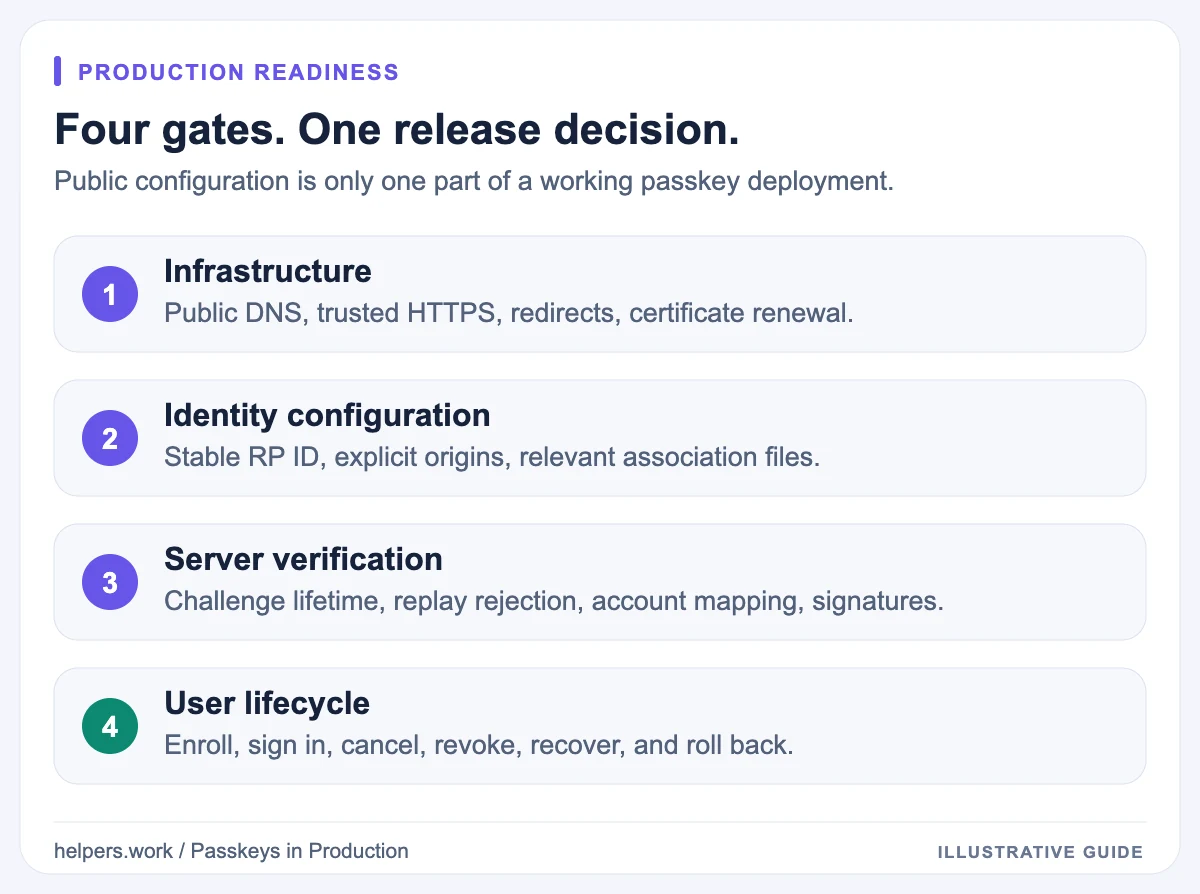
A passkey deployment checklist should cover three separate questions: can the client reach the right configuration, does the server verify WebAuthn correctly, and can a real user complete the entire account lifecycle?
A public scan answers only part of the first question. Before production, combine the Passkey Deployment Checker with backend tests and real browser or app testing. An accessible JSON file is useful evidence, but it is not a successful authentication.
This checklist assumes you already understand the basics of passkeys. Work through it before launch and repeat the relevant sections after domain, CDN, mobile-signing, or authentication changes.
1. Write down the authentication boundary
Record these values before changing infrastructure:
| Item | Illustrative value | Why it matters |
|---|---|---|
| Browser sign-in origin | https://login.example.com |
The origin returned in browser client data |
| RP ID | example.com |
The domain scope of newly created credentials |
| Allowed web origins | Explicit production origins | Server verification must reject unintended origins |
| Credential account store | Your identity service | Every credential must map to the correct account |
| Native applications | Exact released app identifiers | Association files must describe real applications |
These values are examples, not recommended settings for every project. Use domains and application identifiers you control.
Do not infer the RP ID from the marketing homepage. Read the registration and authentication options produced by your server. A site at login.example.com may intentionally use example.com, but it may also use the narrower hostname.
Choosing an RP ID is a long-lived identity decision. Credentials registered for one RP ID do not become credentials for another just because you changed an environment variable. For domain migrations, plan how existing users will authenticate before changing enrollment behavior.
2. Verify HTTPS and DNS from outside your network
Production web authentication requires a secure context. Check the actual sign-in hostname, not just the apex domain.
- Confirm the hostname resolves to the intended public service.
- Verify the certificate covers that hostname.
- Serve a complete certificate chain.
- Check renewal automation and expiry monitoring.
- Verify redirects stay on HTTPS and lead to the intended user experience.
- Test the public edge, not only the origin server behind a CDN.
Use DNS Lookup for resolution and the SSL Certificate Checker for certificate details. The SSL chain guide is useful when browsers and command-line clients disagree.
Local development has browser secure-context exceptions, including supported localhost scenarios. That does not make an HTTP production domain suitable, and it does not mean a public checker should scan your local network. The Helpers.work checker accepts public HTTPS domains on the default port, not localhost or private addresses.
3. Decide which discovery and association files apply
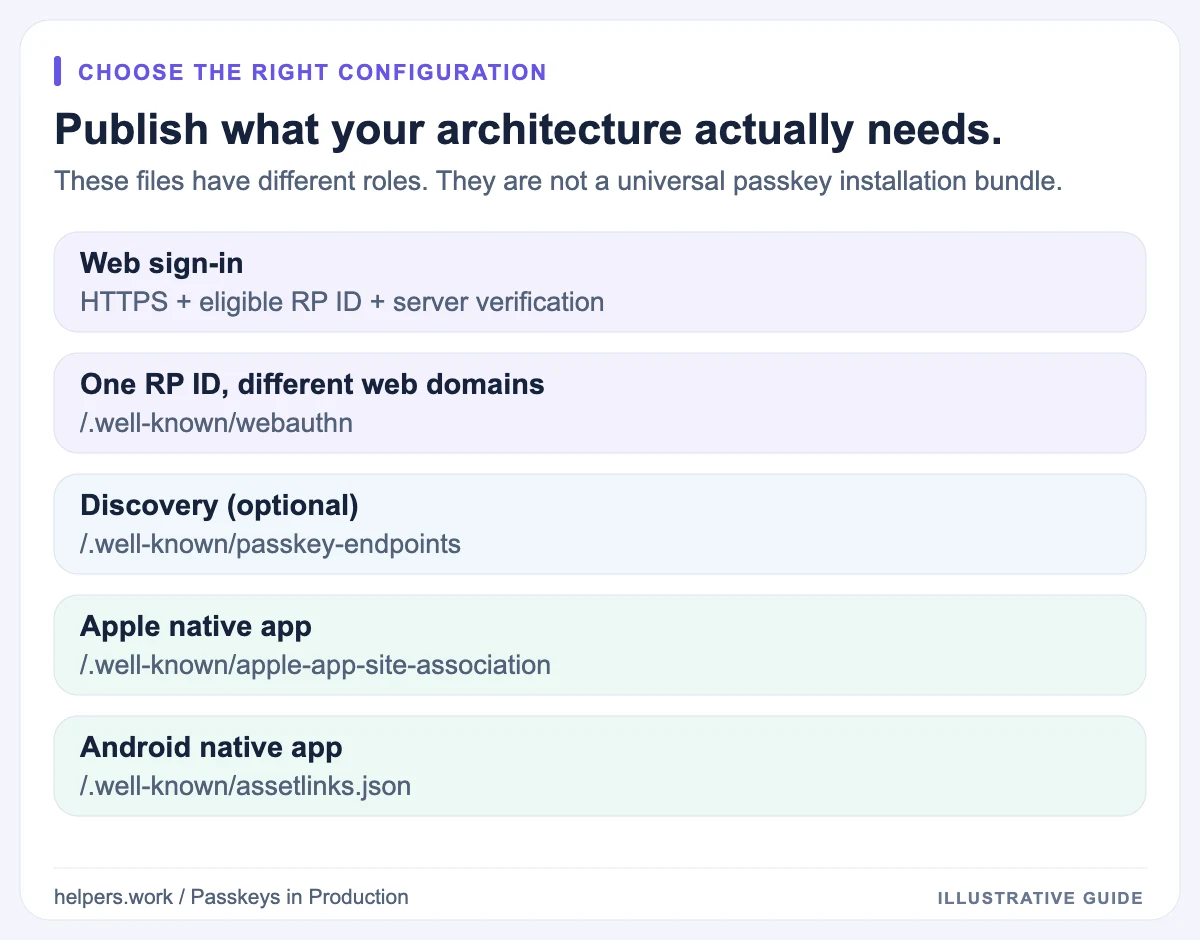
Do not deploy every file by default. Match the configuration to the product:
| Scenario | Configuration to evaluate |
|---|---|
| One web origin using an eligible RP ID | HTTPS, RP ID, server verification |
| Several subdomains using a parent RP ID | RP ID scope and an explicit server origin allowlist |
| Different domains sharing one RP ID | Related Origin Requests and compatible clients |
| Credential-manager links to account settings | Optional passkey endpoints |
| Native Apple app sharing credentials | Associated Domains and webcredentials |
| Native Android app sharing credentials | Digital Asset Links and release signing identity |
For cross-domain web use, read the RP ID and related origins guide. A cookie domain, a CORS policy, or a shared backend does not by itself authorize WebAuthn on another domain.
4. Serve the right document at the right URL
Well-known paths often fail because routing rules treat them like ordinary pages. A catch-all application route can return an HTML shell with status 200, while a redirect rule can move the request to an endpoint the consuming client will not follow.
For a public file you intentionally publish, inspect the status, headers, and body:
curl --proto '=https' --max-time 15 --silent --show-error --include \
  https://example.com/.well-known/passkey-endpoints
Replace example.com with your RP ID domain. This command intentionally does not follow redirects, so a 301 or 302 stays visible. Do not add -k to hide certificate failures.
For passkey endpoints, an illustrative document is:
{
  "enroll": "https://example.com/account/passkeys/new",
  "manage": "https://example.com/account/passkeys"
}
The document should be publicly retrievable, but the account pages it advertises can require authentication. Keep enrollment and management actions protected by your application policy.
The current passkey-endpoints specification also permits an empty object and defines prfUsageDetails for information about PRF use. This is discovery metadata, not your WebAuthn challenge or verification API.
Use the JSON Formatter to catch JSON syntax errors. Syntax validation alone cannot tell whether an origin, app identifier, or certificate fingerprint is the correct one.
5. Check Apple and Android release identity
Native apps add configuration that a web-only flow does not need.
Apple apps
Apple's associated-domain model needs both a website declaration and a matching app entitlement. For passkey credential association, inspect webcredentials, not just applinks.
An illustrative website fragment is:
{
  "webcredentials": {
    "apps": ["TEAMID1234.com.example.app"]
  }
}
Replace the sample identifier with the actual app identifier from your signed application configuration. Confirm that the app declares the relevant webcredentials:domain association.
Preserve other valid sections already in the association file. Replacing the whole file with a passkey-only example can break unrelated Universal Links behavior.
A public file check does not inspect the installed binary or prove that Apple's association cache has refreshed. Validate the distributed app on a device after deployment.
Android apps
Digital Asset Links identifies an Android app by package name and signing-certificate fingerprint. The credential-sharing relation is delegate_permission/common.get_login_creds; Android's setup guidance also describes delegate_permission/common.handle_all_urls for App Links.
Use the certificate belonging to the build users install. Under Play App Signing, that may not be the certificate used to upload the bundle. Keep debug credentials out of the production association unless a separately reviewed requirement explicitly needs them.
If a certificate rotation requires multiple fingerprints, review the supported platform behavior and migration window. Do not remove an older fingerprint before understanding which installed versions still rely on it.
6. Test server verification, not only the browser prompt
Use a maintained WebAuthn server implementation and test your configuration around it. Do not replace the verifier with a signature-only check.
Your verification tests should cover:
- A valid registration response and a valid authentication response.
- An expired, unexpected, or replayed challenge.
- A response from an origin you do not allow.
- A response with the wrong RP ID context.
- Required user-presence and user-verification flags.
- A credential that belongs to a different account.
- A malformed payload or unsupported algorithm.
- Revoked credentials and account deletion.
Challenges need a short validity window and a reliable one-time-use mechanism tied to the intended operation. Concurrent requests should not accidentally make a completed challenge reusable.
Authentication must verify the assertion signature against the correct stored public key. Registration must validate the response before persisting a credential.
Be deliberate about signature-counter policy. Some authenticators and synced credentials do not provide a useful monotonically increasing counter. A counter anomaly needs interpretation using the library and authenticator model; it is not universally proof that a passkey was cloned.
7. Exercise the account lifecycle on real clients
Create a client matrix based on your users, not on the developer laptop that completed the demo.
| Test | Evidence to record |
|---|---|
| Create first passkey | Credential is stored against the intended account |
| Sign out and sign in | A fresh challenge produces a verified session |
| Cancel the prompt | The page remains usable and explains the next step |
| Use another device | The intended sync or cross-device flow works |
| Add a second credential | Both credentials remain manageable |
| Revoke one credential | The server refuses subsequent authentication with it |
| Recover an account | The approved recovery policy is enforced |
| Try an unsupported client | A clear, tested alternative remains available |
For mobile apps, test release or distribution-equivalent builds. Debug-build success does not establish that the release signing identity and associations match.
Conditional UI, autofill, cross-device flows, and related-origin requests can have different compatibility boundaries. Feature detection helps select the interface, but a real ceremony is still necessary to validate the complete deployment.
8. Make recovery and rollback part of the release
Before removing an existing sign-in method, verify that a user can lose their primary device without either permanent lockout or an unsafe support bypass.
Define which recovery actions require additional verification, whether recovery triggers notifications, and when a recovered account can enroll a new credential. Test attempts to add a credential from a stale or lower-assurance session.
Plan rollback around user access. Disabling new enrollment can be reasonable during an incident; disabling authentication for already enrolled users may lock them out. Keep the distinction explicit in release controls.
Preserve credential records and the RP ID during an ordinary frontend rollback. A schema rollback that discards registered public keys is not just a UI rollback.
9. Monitor outcomes without storing credential payloads
Track aggregate success, cancellation, timeout, and server-rejection rates. Split metrics by a useful, limited client classification when needed, rather than storing raw user-agent strings or complete authenticator responses by default.
Alert on infrastructure failures such as broken HTTPS, unavailable required association files, or a sudden increase in origin-validation failures. Avoid treating every user cancellation as an outage.
Assign owners to the authentication service, domain configuration, mobile signing setup, and recovery process. Many deployment bugs cross those ownership boundaries; a release checklist is ineffective if no one owns the next action.
Final release gate
Run the Passkey Deployment Checker with the actual RP ID and relevant expected app values. Use the report interpretation guide to distinguish a required failure from an optional missing file.
Release only after public configuration, server verification, client testing, and recovery evidence agree. No single green report replaces those four layers.