A WebAuthn RP ID is the domain identifier a credential is scoped to. A web origin identifies the browser context making the request: scheme, hostname, and port. Most deployment mistakes begin by treating these two values as if they were the same.
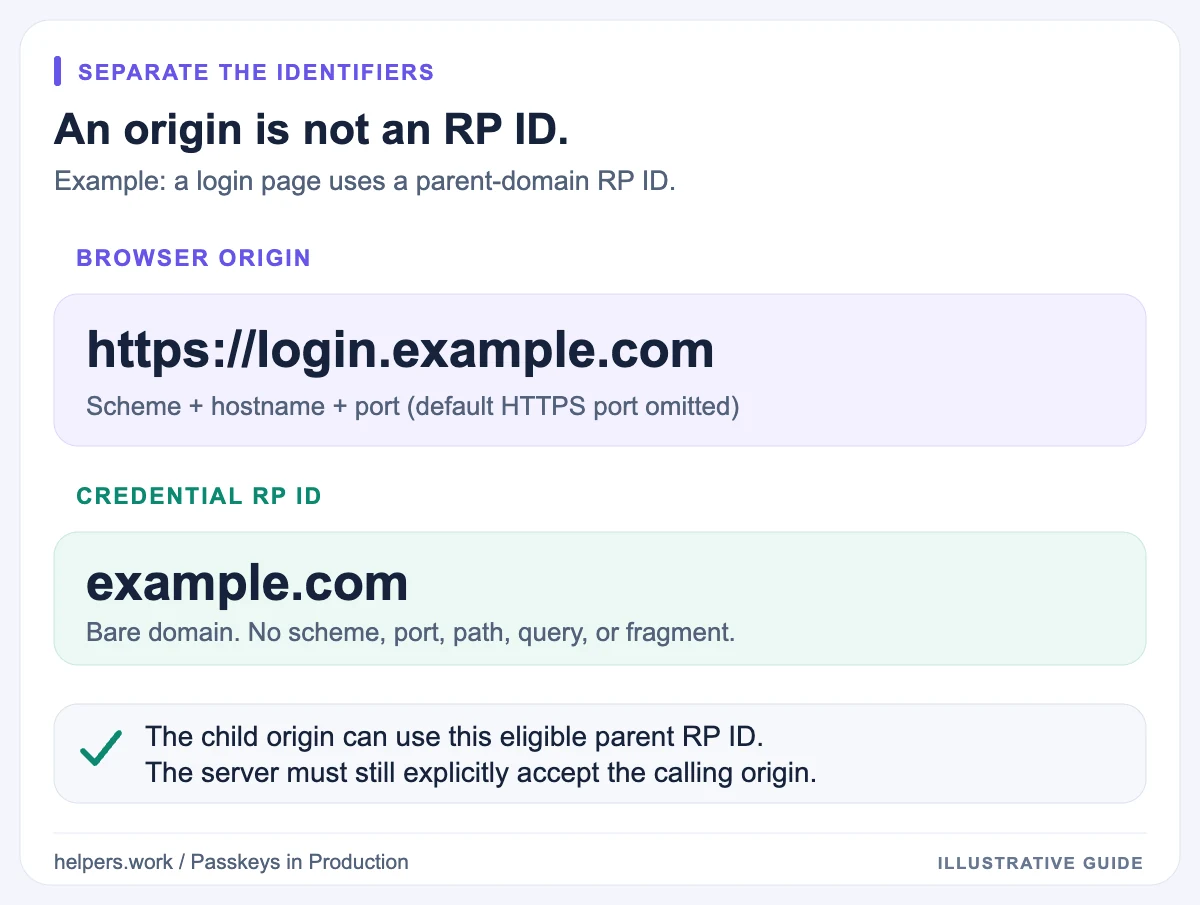
For example, a page at https://login.example.com can use example.com as its RP ID under the ordinary domain relationship rules. A page at https://example.co.uk cannot do that automatically. A supported related-origin configuration can authorize the second case, but simply sharing a company name or a backend cannot.
Use this guide to design the boundary before rollout or to investigate a mismatch reported by the Passkey Deployment Checker. For the surrounding release process, see the production passkey checklist.
RP ID versus origin
Consider a browser visiting:
https://login.example.com/account/sign-in?next=settings
The values are:
| Concept | Value |
|---|---|
| Full URL | https://login.example.com/account/sign-in?next=settings |
| Origin | https://login.example.com |
| Hostname | login.example.com |
| Possible RP ID | login.example.com or an eligible parent such as example.com |
Paths, query strings, and fragments are not part of an origin. A non-default port is part of an origin, but it is not part of the RP ID.
The RP ID appears in different option shapes: registration uses publicKey.rp.id, while authentication uses publicKey.rpId. Your server's expected RP ID must agree with the credential being used.
The following is an illustrative comparison, not a complete ceremony:
Registration option:    publicKey.rp.id = "example.com"
Authentication option: publicKey.rpId  = "example.com"
Expected web origin:    "https://login.example.com"
An RP ID is not a display name, an OAuth client ID, or a URL. Do not paste https://example.com/login into an RP ID field.
The ordinary domain relationship rules
Without Related Origin Requests, the RP ID must be the calling origin's effective domain or an eligible domain suffix of it. Public suffixes, such as com or co.uk, are not valid shared RP IDs.
For a normal HTTPS website, these examples illustrate the relationship:
| Calling origin | RP ID | Ordinary relationship |
|---|---|---|
https://login.example.com |
login.example.com |
Same hostname |
https://login.example.com |
example.com |
Eligible parent domain |
https://example.com |
login.example.com |
Not an eligible parent |
https://shop.example.com |
login.example.com |
Sibling hostname, not a parent |
https://example.co.uk |
example.com |
Different domain |
https://login.example.com |
com |
Public suffix, not allowed |
The direction matters. A child origin can ordinarily use an eligible parent RP ID; the parent origin cannot automatically use a child RP ID.
Do not approximate public suffix rules by always removing the first hostname label. Domains under multi-label suffixes and hosted platforms make that shortcut unreliable. Use standards-aware libraries when validating domain relationships.
Sharing passkeys across subdomains
Suppose both accounts.example.com and shop.example.com need to use credentials registered for example.com. Under the ordinary rules, they can request that parent RP ID without publishing a related origins file.
Three conditions still matter:
- The credentials were actually created for
example.com. - Both applications use the correct credential and account data.
- The backend verifier allows the specific origins that should authenticate.
Cookies and account sessions are a separate design. A usable passkey on two origins does not automatically create a shared session or determine how authorization should work between applications.
Choosing a parent RP ID also expands the set of origins that can ask the browser for that RP's credentials. Keep server origin validation explicit, and protect delegated subdomains. An abandoned staging hostname or a user-controlled subdomain should not silently become an accepted authentication origin.
When Related Origin Requests are needed
Related Origin Requests address a different problem: using one RP ID from a web origin that does not satisfy the ordinary relationship rule.
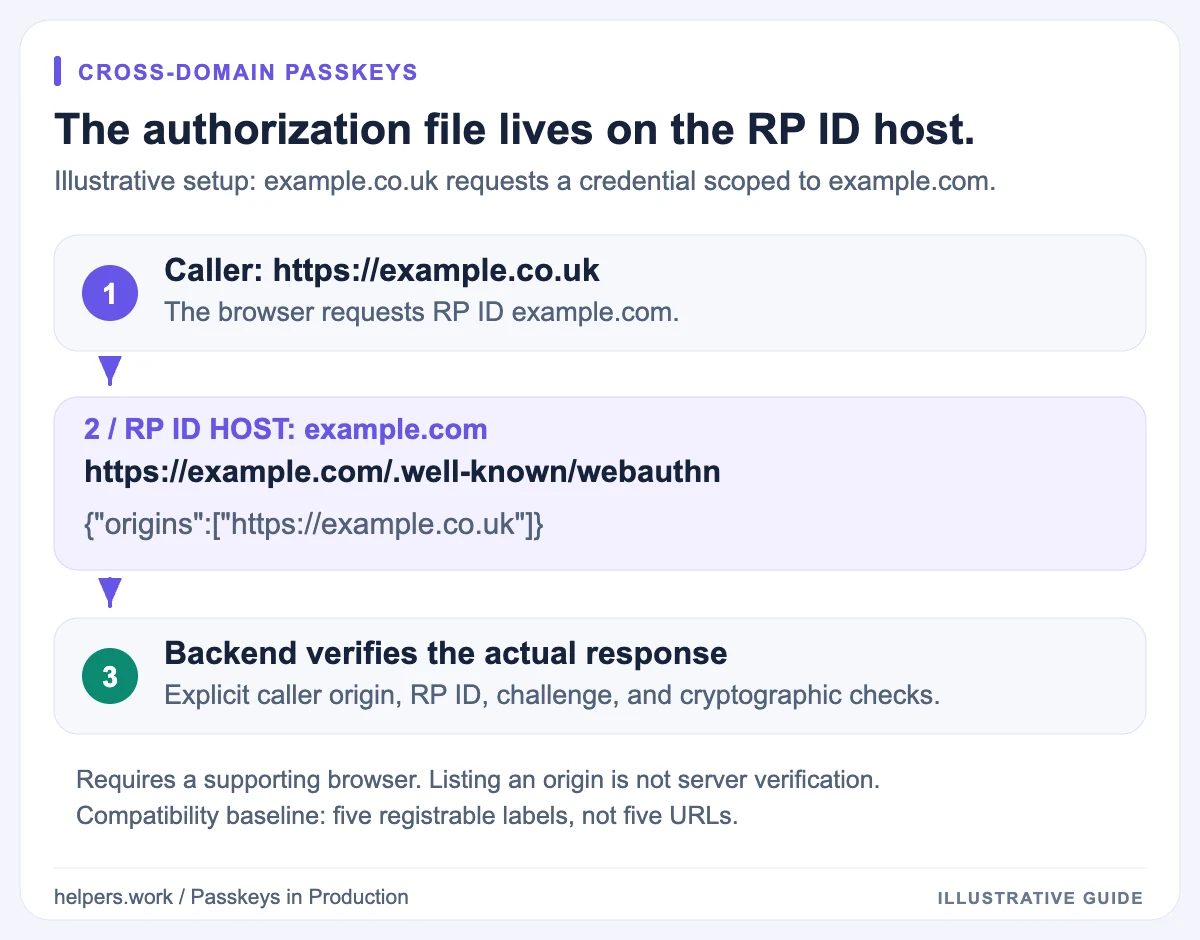
For example, an organization might use example.com as the RP ID while also operating a sign-in page at https://example.co.uk. To authorize that origin, it publishes a document on the RP ID domain:
https://example.com/.well-known/webauthn
An illustrative document is:
{
  "origins": ["https://example.co.uk", "https://login.example.net"]
}
Serve the JSON with an appropriate application/json content type and a successful response. Keep the public endpoint available without an authenticated session or a JavaScript challenge.
The browser checks whether the calling origin is authorized before proceeding with the requested RP ID. The application must still use the correct RP ID in its options and perform server-side verification.
Publishing this file on example.co.uk instead of example.com does not authorize example.co.uk to use the example.com RP ID. The location is part of the trust mechanism.
Related origins do not replace server verification
The browser's related-origin decision and your server's origin policy solve different problems.
The public document tells a supporting browser that certain origins may request credentials for the RP ID. The server verifies whether it will accept the response from the actual caller.
Keep both sides intentional:
RP ID:                  example.com
Related origin allowed: https://example.co.uk
Server origin allowed:  https://example.co.uk
Credential store:       account and public key for the same RP
Do not solve a cross-domain rejection by accepting arbitrary origins on the server. That discards a verification boundary instead of fixing the configuration.
Likewise, CORS headers do not authorize a WebAuthn RP ID. CORS controls certain browser cross-origin network access. Cookie settings control cookie scope and delivery. Neither substitutes for the WebAuthn relationship rules.
Understand the five-label compatibility boundary
Related-origin processing counts distinct registrable domain labels, not just URLs and not full domain names.
For example:
example.comandexample.co.ukshare the labelexample.login.example.netalso contributes the labelexample.example-rewards.comcontributes a different label,example-rewards.
Supporting implementations must handle at least five distinct labels in the specified procedure; they may support more. The checker uses that five-label baseline to identify configurations that can depend on extra client support.
Order can matter when a client reaches its label limit. An origin can appear in the document yet be ignored because it introduces another label after the supported budget is exhausted.
Do not describe this as "only five lines are allowed" or promise that every browser accepts an arbitrarily long list. Keep the list focused, put required relationships under change control, and test the supported browser population.
If you need a large collection of unrelated customer domains, a central sign-in flow may be a clearer architecture than stretching related-origin configuration across every tenant.
Browser support is part of the deployment
WebAuthn support does not automatically imply support for every WebAuthn feature. A browser may support ordinary passkeys without supporting your intended related-origin flow.
Where available, capability detection can help select the interface, but it cannot establish that the server file, account mapping, and verification configuration are all correct.
Maintain a tested compatibility matrix instead of copying a browser-version table into a permanent policy. Include managed devices, embedded browsers, and mobile combinations your users actually have.
An unsupported client can reject an otherwise correct related-origin setup. Plan an explicit alternative, such as directing the user to the primary sign-in domain, without silently weakening origin verification.
Debug a mismatch in a repeatable order
1. Capture the actual caller and RP ID
Inspect the origin where navigator.credentials.create() or navigator.credentials.get() runs. A marketing page that redirects to a login host is not necessarily the origin that matters.
Then inspect the options generated by your backend. Do not assume the RP ID equals the hostname just because that is the default in a tool.
2. Decide whether the ordinary relationship is enough
If the caller is https://login.example.com and the RP ID is example.com, related origins are not normally required. Investigate the server allowlist, credential history, and other ceremony conditions before adding more configuration.
If the domains are unrelated, inspect the related origins endpoint on the RP ID host.
3. Inspect the response, not the browser page
curl --proto '=https' --max-time 15 --silent --show-error --include \
  https://example.com/.well-known/webauthn
Replace the example domain with your own RP ID. Check whether you receive JSON, an HTML fallback, a login redirect, an access-denied response, or a transport error.
The Helpers.work related-origin check follows bounded HTTPS redirects. That is different from several other well-known checks, where redirects are not accepted. Serving the document directly is the simplest arrangement to operate.
4. Match exact origins and client coverage
Compare schemes, hostnames, and any non-default port. Do not use wildcards or path patterns as if this were a reverse-proxy route. Use origin-only entries for clarity.
Use the JSON Formatter for syntax, DNS Lookup for resolution, and the checker report guide for result interpretation. A SecurityError is a clue, not a complete diagnosis; other policy or context problems can produce security-related failures too.
Changing domains without stranding existing users
Credentials remain scoped to the RP ID for which they were created. Renaming the RP ID does not rewrite stored authenticators.
During a migration, inventory existing RP IDs and determine whether retaining the original RP ID through a supported related-origin setup is appropriate. Otherwise, plan authenticated re-enrollment and a recovery route for clients that cannot follow the new flow.
Keep control of the original RP ID domain and required configuration for as long as existing credentials depend on it. A domain migration is therefore also a credential-lifecycle migration.
Return to the passkeys overview for the security model or browse the security guides for deployment foundations.